You might like:


About this App
East School English vocabulary SAT Vocabulary simple application that can recite
★Required application for test takers
★ Consists of ‘1,500’ words with high frequency
★ Clean design, convenient function, short-term, high-efficiency English word memorization learning app
▶Name: English Broadcaster-SAT English Vocabulary / English Broadcaster-SAT
'English Broadcaster - English Vocabulary for Scholastic Ability Test'
As a free vocabulary application provided by English Dong School,
Based on the previous words frequently asked in the SAT exam for the last 10 years
It is an English word memorization app that summarizes 1,500 words.
The user turns through words consisting of 50 words at a time.
You can check the spelling and meaning of a word.
Pronunciation, intonation, etc.
We can learn together.
the meaning of the word
By checking the time difference
Efficiency of memorizing English words in a short time
It is designed to be maximized.
Users can select the desired date out of a total of 30 days.
can move,
With a clean design and familiar icons
Hide meaning, silent mode, pronunciation, etc.
Various functions are easily accessible.
※ Depending on the user-specified font, the font size and font may vary.
⇒Smartphone [Preferences] → [Device] → [Font] → [Font Size] → Set to 'Maximum Small'
▶Configuration
- SAT (SAT English) is composed of 1,500 English words with high frequency
- 50 words per day (once)
- DAY1~DAY30 (30 days in total / 30 times in total)
- Check spelling, spelling, meaning, pronunciation, and intonation
▶Function
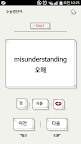
1. DAY : You can move to the desired date.
2. Previous and Next Buttons: You can move to the previous or next word.
3. Meaning button: Click the button to hide the meaning of a word.
4. Auto button: You can automatically skip through the entire word of one DAY.
5. Voice button: You can hear the pronunciation of words.
▶ Advantages
- A large amount of English words can be memorized within a short period of time.
- By checking the meaning of the word with a time difference, you can memorize the word at the same time as checking the word.
- You can study by date, which is appropriately divided by 50 words a day.
- By utilizing various learning themes and functions, you can enjoy and effectively learn using your eyes and ears while watching and listening.
- You can perform a word test in Meaning Hide mode.
- By using automatic mode, you can memorize repeatedly through automatic learning.
- By listening to the pronunciation together, you can prepare for speaking tests such as TOEIC Speaking (Toss) and Opik.
- Easy to use with a clean and convenient design.
▶English Vocabulary Series (Free Vocabulary App)
▶Site http://www.05dong.com
-------------------------------
Producer: Smart Dong School
Developed by: Park So-yeon
Design: Kim So-mi, Bae Ha-rin
Planning and Management: Kim In-jin, Kim Yu-min, Kim Hye-joo, Kim Hwa-ran
Developer Contact:
Phone: 02-929-5095
Email: help@smartdongs.com
Address: 121-795
396, World Cupbuk-ro, Mapo-gu, Seoul
R&D TOWER No. 1102 Smart East School