You might like:


About this App
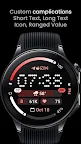
Sleek, modern, and feature packed watch face. Mix colors, fonts & complications!
Only for Wear OS 4+ devices
// Not suitable for rectangular watches
Powered by Watch Face Format
Disclaimer for Galaxy Watch Users: The watch face editor in the Samsung Wearable app often fails to load complex watch faces like this one. This is not an issue with the watch face itself. It is recommended to customize the watch face directly on the watch until Samsung resolves this issue.
amoledwatchfaces.com
BUY ONE GET ONE OFFER!
amoledwatchfaces.com/bogo
CUSTOM COMPLICATION APPS
amoledwatchfaces.com/apps
FEATURES
• Watch Face Format 1 / 2
• compatible with latest Wear OS devices (Galaxy Watch7 / Pixel Watch 3)
• flavors feature support (Wear OS 5)
• 8 custom complication slots (max)
• includes complication types - SHORT_TEXT, LONG_TEXT, RANGED_VALUE, MONOCHROMATIC_ICON
• two LONG_TEXT / RANGED_VALUE Arc slots (support very long texts)
• phone notifications complication support*
• dual batteries (watch / phone) support*
• multilanguage
• 12/24h (h:mm, HH:mm)
• option to disable leading zero in 12h mode
• optional seconds indicator
• blinking digital clock colon effect
• battery saving time-only always on display
• true black background
• material color themes (palette)
• choose between different digital clock fonts
• make it your own, combine theme & digital clock tint & gradients
• tap Digital Clock to open Alarm
* requires Phone Battery Complication app
https://play.google.com/store/apps/details?id=com.weartools.phonebattcomp
USER CONFIGURATIONS
• Material Theme (60+)
• Digital Clock Tint (60+)
• Gradient Slot 1 (20+ gradients, Tint, White)
• Gradient Slot 2 (20+ gradients, Tint, White)
• Ambient Mode (2x)
• Digital Clock Font (13x)
• Right Badge (None, Am-Pm, Seconds)
• Center Chip Outline (Toggle)
• Seconds Indicator (Toggle)
• Notifications Badge (Toggle)
• Leading Zero (12h) (Toggle)
• Custom Complications (8x)
Installation and troubleshooting guide
amoledwatchfaces.com/guide
Please send any issues reports or help requests to our support address
support@amoledwatchfaces.com
Join our Telegram group for live support and discussion
t.me/amoledwatchfaces
Newsletter
amoledwatchfaces.com/contact#newsletter
amoledwatchfaces™ - Awf