You might like:


About this App
Find EV charging stations
FIND. CHARGE. PAY. GO.
The ChargePoint app seamlessly connects drivers to the world’s largest EV charging network with hundreds of thousands of available stations and roaming partners to choose from. Finding, using and paying for charging your EV has never been easier. The ChargePoint app is the only all-in-one driver solution with smooth tech integrations and premium driver features so you can finally leave your wallet at home. Charge, drive and live better now with the ChargePoint app.
Download the ChargePoint app to:
FIND A PLACE TO CHARGE
Discover real-time charging station availability with the ChargePoint map.
CHARGE AT ROAMING PARTNER STATIONS
Use your ChargePoint app and account to charge at FLO, EVgo, Greenlot and EV Connect stations.
CUSTOMIZE YOUR STATION FILTERS
Use filters to see only stations that work with your car and filter for AC or DC fast chargers for maximum convenience.
SEE EVERYTHING YOU NEED TO KNOW
Find the most important information about a charging station, including station availability, pricing, popular times to charge, charging history, driver tips and more.
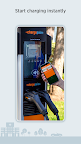
START CHARGING INSTANTLY
Begin charging via Tap to charge, directly in the ChargePoint app or with your RFID card.
TRACK YOUR COMPLETE CHARGING ACTIVITY
See your charging history and trends, including miles added and cost. Easily control both your public and home charging in a single app.
GET LIVE UPDATES
Receive real-time notifications and reminders about your charging status, including when a station becomes available, your car finishes charging and a charging session’s cost.
ENJOY CONVENIENT WIDGETS
Activate widgets to seamlessly find nearby stations, view your charging status, manage home charging and more without opening the app.
LEARN FROM DRIVER TIPS
Get station advice complete with photos from other drivers to better navigate and enjoy ChargePoint’s global app and roaming network.
CHARGE AT HOME
Use the ChargePoint app to charge your EV at home with ChargePoint Home Flex. Schedule charging, set reminders, get notifications, track usage and more.
JOIN A VIRTUAL WAITLIST
Reserve a charging spot from anywhere via our virtual Waitlist feature.
MAXIMIZE CHARGING WITH YOUR WEAR OS BY GOOGLE
Tap to charge with your Wear OS by Google to start charging instantly and easily see miles added to your range.
LOCATE STATIONS AND MORE WITH ANDROID AUTO
Easily access charging info while on the road with your Android Auto in-vehicle display.