You might like:


About this App
AccuBattery monitors battery health performance via science
AccuBattery displays battery usage information, and measures battery capacity (mAh) based on science.
❤ BATTERY HEALTH
Batteries have a limited lifespan. Every time you charge your device, it wears out the battery, lowering its total capacity.
- Use our charge alarm to remind you to unplug your charger.
- Discover how much battery wear was endured during your charge session.
📊 BATTERY USE
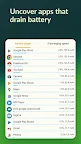
AccuBattery measures the actual battery usage using information from the battery charge controller. Battery usage per app is determined by combining these measurements with information on which app is in the foreground. Android calculates battery usage using pre-baked profiles that device manufacturers provide, like how much power the CPU uses. In practice however, these numbers tend to be highly inaccurate.
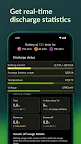
- Monitor how much battery your device is using
- Know how long you can use your device when it’s active or in standby mode
- Find out how much power each app uses.
- Check how often your device gets woken up from deep sleep.
🔌 CHARGE SPEED
Use AccuBattery to find the fastest charger and USB cable for your device. Measure the charging current (in mA) to find out!
- Check how fast your device is charging when the screen is on or off.
- Know how long it takes to charge your phone and when it’s finished.
HIGHLIGHTS
- Measure real battery capacity (in mAh).
- See how much wear your battery sustains with each charge session.
- Look up the discharge speed and battery consumption per app.
- Remaining charge time - know how long it takes before your battery is charged.
- Remaining use time - know when you will run out of battery.
- Screen on or screen off estimations.
- Check the percentage of deep sleep, when the device is in standby mode.
- Ongoing notification for real time battery statistics at a glance.
🏆 PRO FEATURES
- Use Dark and AMOLED black themes to save energy.
- Access to historical sessions older than 1 day.
- Detailed battery statistics in notification.
- No ads
We're a small, independent app developer with a focus on quality and passion for battery statistics. AccuBattery doesn’t require access to privacy-sensitive information and doesn't make false claims. If you like the way we work, support us by upgrading to the Pro version.
Tutorial: https://accubattery.zendesk.com/hc/en-us
Need help? https://accubattery.zendesk.com/hc/en-us/requests/new
Website: http://www.accubatteryapp.com
Research: https://accubattery.zendesk.com/hc/en-us/articles/210224725-Charging-research-and-methodology