You might like:


About this App
Filmic Remote v3 is now called Remote Legacy.
Filmic Remote v3 is now called Remote Legacy. Filmic Remote v4 is now integrated directly into Filmic Pro v7.5.
Remote Legacy is designed for use with Filmic Pro v7.4.5 and earlier (including Filmic Legacy). It offers wireless control and monitoring of your Filmic Pro experience. Filmic Remote puts your spare Android devices into the production process.
Remote v3 offers three modes of capability: Control, Monitor and Director.
Control mode provides the familiar Filmic Pro interface for complete remote camera control over hard to reach camera placements such as sliders, jib arms, car mounts, microphone stand or other compelling live event camera placements. Set up your Filmic Pro device and then control all settings and recordings from the Remote:
- Start/Stop record functions.
- Focus/exposure reticle placement and locking.
- Dual arc slider manual controls for focus and exposure.
- Pull-to-point focus and exposure pulls.
- Create and load Filmic Pro presets from Filmic Remote.
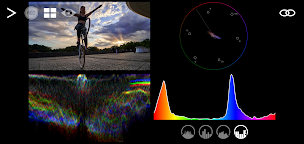
Monitor mode gives you cinema production capability for a fraction of the cost, offering a four-up display with the following powerful analytics:
- Video preview: Reference video for use with analytics screens.
- Waveform monitor: Visually identifies signal brightness segmented from left to right across a video feed. Used in conjunction with the video preview it can provide a quick snapshot of brightness in your video.
- Vectorscope: Displays color saturation, by channel, across the entire image.
- Histograms: RGB composite, Luminance, Zone and RGB channel.
Director mode provides a clean video preview. This is perfect for providing a director, producer or crew with a device to monitor the production remotely.
You can switch between modes on the fly to check analytics and composition. Remote can also be set up in ‘preview-only’ mode allowing a camera operator to perform all controls from the device running Filmic Pro and allowing the Remote to be used solely for monitoring.
Create your mobile studio today with Filmic Remote!
Notes:
- Filmic Remote connects to Filmic Pro (Android only) using WiFi either on an established network or using WiFi-Direct network (for using in areas where a WiFi network is not present).