About this App
Lock screen and keep your Game or App active!
Games and Apps are running while your screen is on and unlocked.
This app allows you to lock and blackout screen without stopping the game/app process. In this case, you can put your smartphone in your pocket and walk without fear of unwanted screen presses. Also, you can save battery life by putting the screen in a lower power state.
For Amoled screen's devices, this means close to zero battery drain while, in LCD screens, the lowest brightness will help a lot to save battery. For devices with Root access, we have a special option, to turn off the screen completely.
This app uses Accessibility services.
Free features:
1. Automatically detecting when Game started
2. You can create own list of apps to activate Battery GO Helper
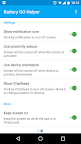
3. Use several methods of locking screen: Notification, Proximity sensor, Floating button
4. Several ways to unlock: single, double, long click, volume button
5. Keep the screen always on while the game is in the foreground.
6. If you have a compatible device the proximity sensor will turn the screen off, so this is also good for LCD devices.
7. Sound control when the screen is black. Mute or maximize sound
8. Lock the hardware buttons while the app is running!
9. Special option for device with Root access.
Paid features:
1. Using a device orientation and volume button to lock screen
2. Ability to set Pattern lock
How to use:
1. Activate application
2. Launch a game or app from the selected list!
3. Use any way to block screen, from selected in the Settings section
4. Double tap by a screen to go back
Notes:
1. Don't press your phone's power button after locking the game/app as that would cause your screen to fully turn off and for the game/app to stop.
2. My Accessibility service on my Android keeps getting disabled. Why? It may be to do with Samsung's App Optimisation feature. Go to Android Settings > General > Battery > look under App Optimization and select Details. Then find Battery GO Helper and turn it off.
You can help me translate the app into your language: https://goo.gl/onqgDh
Do you have any questions? Please contact us at battery.go.helper@gmail.com. We long to know your honest opinion and get your feedback.