
You might like:


About this App
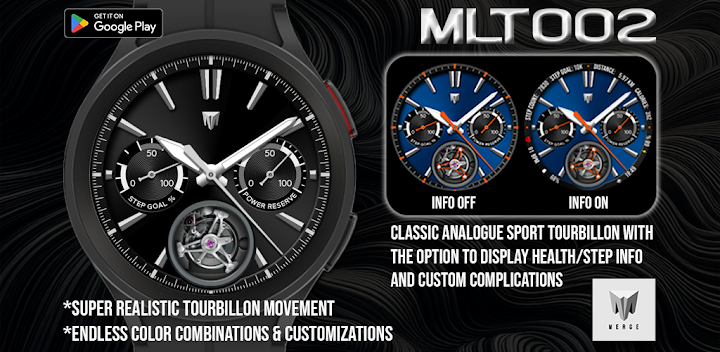
Ultra-realistic Sport-Tourbillon watch face made for Wear OS
This is a beautiful, ultra-realistic, entirely drawn from scratch, tourbillon movement watch face made for Wear OS is available in traditional trim colors, or if you’re feeling bold, some wild colors are available too as well as to options to customize to your heart’s content. Another feature of this watch face is the ability to turn the health, steps, and complications that are shown in the outer bezel ON or OFF to give you the option of having a classic tourbillon, or something a little more modern all in one watch face.
Features include:
* Realistic tourbillon movement. For those who appreciate watch making and classic, traditional, high-end pieces, this is the watch face for you. No where else can you find such a meticulously, drawn from scratch, multi-part, tourbillon movement that pays very close attention to detail to match how a real tourbillon movement works. This tourbillon movement is also unique because it is entirely code-based, meaning that it can deliver very smooth, realistic animated movement unlike the limiting, chunky, resource eating alternative of an animated GIF which is often seen on many other tourbillon attempts.
* In customize menu: toggle information around the outside bezel ON/OFF. In OFF state, the information is covered by a traditional bezel.
* 14 different color themes to choose from.
* 10 different colored backgrounds from traditional to totally wild colors.
* 2 customizable Small Box Complications located at the bottom left and right of the watch face allowing for the addition of the information you want to be displayed. (Text+Icon).
* Displayed numerical watch battery level as well as analogue style gauge indicator (0-100%). Tap the battery icon to the right sub-dial to open the watch battery App.
* Displays daily step counter with STEP GOAL % analogue style gauge indicator. Step goal is Synced with your device through Samsung Health App or default health app. The graphic indicator will stop at your synced step goal but the actual numeric step counter will continue to count steps all the way up to 50,000 steps. To set/change your step goal, please refer to the instructions (image) in the MLT002 Google Play Store description. Also displayed along with step count is calories burned and distance travelled in KM or Miles. A check mark (✓) will be displayed in the left sub-dial to denote that step goal has been reached. (see instructions in main store listing for complete details).
* Displays heart rate (BPM) and you can also tap the heart rate area to launch your default Heart Rate App.
* In customize menu: toggle AOD effects ON/OFF
* In customize menu: toggle to display distance in KM/Miles.
* In customize menu: toggle to display second hand ON/OFF
**for more details on any of these features, please refer to the comprehensive instruction provided in this watch face’s main store listing in Google Play Store.
Made for Wear OS


