About this App
A nice app that displays the maximum and the current values of the UV index.
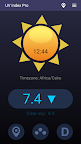
UV Index Pro is an easy-to-use application that displays the maximum and the current values of the ultraviolet index. This accurate measuring tool (portrait orientation, Android 6 or newer) works on the tablets and smartphones that are connected to the Internet. At first, it gets the local coordinates (latitude and longitude) from your device's GPS and then retrieves the UV index from an Internet server. The value of this index is given according to the international standard and represents the strength of the sunburn-producing ultraviolet radiation at your location (its current intensity). However, the real UV index depends on many factors, such as the angle of the Sun in the sky (current hour), stratospheric ozone, cloud conditions, and air pollutants. More importantly, you have to know that the reflection from snow or other bright surfaces like water, sand, or concrete can nearly double this index.
This app features four big buttons on the first page, and their functions are (left to right):
1. Update location: re-read your current location and show the updated index.
2. Forecast: shows the graphs of the estimated UV indexes for the next five days. Pan left-right to see the hourly levels.
3. Vitamin D: shows the graphs of the estimated Vitamin D intakes. Pan left-right to see the total intake for the respective hours, assuming maximal sun exposure.
A few important recommendations for protection, very useful in case you are exposed to sunlight, are displayed when you tap the UV Index.
How to see locations on Google Maps
To see your current location:
- Tap the View Location button next to the Menu
- Look for the exact position of the Red Pin
How to update current location from Google Maps
Tap the same button and then:
- Press and hold a point on the map where you want to drop a red pin. (Choose an unlabeled area near the place where you want GPS coordinates.)
- Your coordinates will appear in the Search box at the top
- Long press on those coordinates, and you should see an option to copy; tap it.
- Return to UV Index Pro and select Yes when asked to update location.
Vitamin D intake
To have a correct evaluation and recommendation for the intake, you should:
- Go to Settings and select your Skin Type first.
- Go to Settings and select your Age Group.
Disclaimer
Please note that our app is by no means a substitute for professional medical advice regarding sun exposure and Vitamin D intakes. We assume no liability for the accuracy and results.
Latest features
-- Hourly estimations for the total Vitamin D intake
-- Hourly intake of Vitamin D if sunscreen is used - SPF 2..50
-- Accurate Five-day forecast for the UV index
-- instant display of the UV index at your current location
-- no ads, no limitations
-- only one permission is required (Location)
-- this app keeps the phone's screen on
-- the color of the Sun's surface follows the UV index
-- the value of any index can be said in English if you tap it.
(set the speech engine to English)
-- useful recommendations for protection