
You might like:


About this App
Lotus Celestial: Luxury watch face, Arabic Dial, minimal AOD, Automatic movement
This app is for WearOS devices.
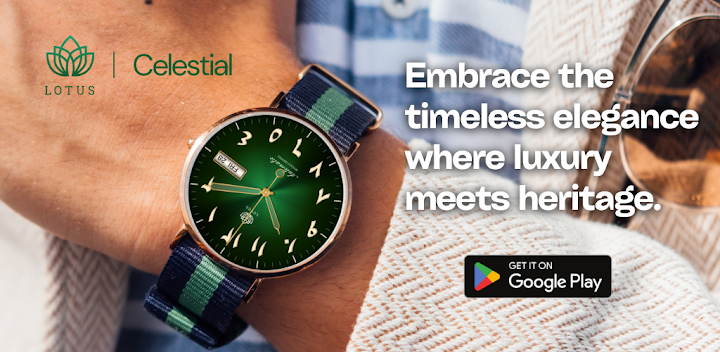
Discover the epitome of luxury and sophistication with the Lotus Celestial Arabic Watch Face. Designed for connoisseurs of fine timepieces, this watch face brings the classic elegance of traditional Arabic numerals to your smartwatch.
Key Features:
• Exquisite Design: Two stunning dials to match your style – Classic Black (for AOD) and Opulent Green.
• Authentic Arabic Numerals: Enjoy the timeless charm and enhanced readability of beautifully crafted Arabic numerals.
• Day and Date Display: Stay organized with a conveniently placed day and date display.
• Minimal AOD Screen: Save battery life with a customizable, minimal Always-On Display (AOD) screen that maintains elegance and functionality.
• Automatic Movement: Adds a touch of authenticity and class, reminiscent of high-end luxury watches.
Upgrade your smartwatch experience with the Lotus Celestial Arabic Watch Face, where every glance at your wrist is a reminder of exquisite craftsmanship and timeless elegance. Available now on the Play Store.
Installation Instructions:
1. Download and install the app on your Wear OS device.
2. Open the Wear OS app on your connected smartphone.
3. Select "Watch Faces" and choose Galaxy Time Pro.
4. Long-press on your watch face to access customization options.
Additional Notes:
• This app may also require its companion app to be installed on your smartphone for full functionality (if applicable).
• If you encounter any issues or require assistance, please don’t hesitate to reach out to our dedicated support address: support@mubaraktech.com


