Featured Banner
Icon

iPlay VR Player SBS 3D Video

© Panagola Private Limited

3.3 2110219

Source: Google Play Store

Category: Video Players and Editors

Price: Free

Content Rating: for everyone

Requires: Android 4.1+

Released on: 2016-01-30

This App is not yet included in [apkz.com]. You can click the button below to request.

(The more people request, the faster it may be included)

☑ We will notify you as soon as the App is available. If you can't receive notifications, please check back often.

About this App

SBS VR Player for Videos with 3D, Subtitles and HBS support. Just 0.2Mb in size.
A simple, ad-free, tiny (only 0.2 MB!) video player that plays 2D and 3D videos suitable for Virtual Reality VR headsets that use mobile as the screen. It supports Side-by-Side (SBS) as well as Half Side-by-Side (HBS / HSBS) format videos. It works on any phone, limited only by the device's video capabilities.

FEATURES
- View any video in SBS Mode for VR Headsets
- Plays SBS & HBS video with correct aspect ratio
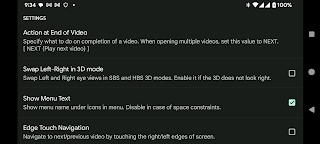
- View SBS 3D & HBS 3D as a normal video
- Support for external SRT subtitles
- Can be accessed from your file manager
- Mode for normal, non-SBS video
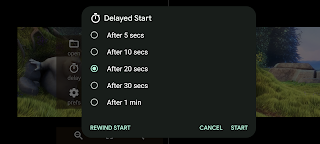
- Delayed start mode for time to insert mobile in headset
- Does not need gyroscope-enabled phones
- Lightweight, Ad-free, No unwanted permissions

A few points to note:
- It will play only video formats that are natively supported by your phone (more info below)
- It does not play web videos. Use our iWebVR app for that.
https://play.google.com/store/apps/details?id=com.panagola.app.iwebvrtrial
- It does not use the magnetic navigator controls, head tracking etc.
Use an OTG or Bluetooth mouse instead.
- It does not play 180 or 360 degree Full Virtual Reality videos.
- It is a player, not a converter. It cannot save converted files.
- The app does not include any media codecs due to its tiny size. It supports whatever the Android OS in your device supports.

Please mail us (support@panagola.com) in case of any doubts.

Screenshots

I'm not a robot

In order to block spam bots, we push you a notification with the following code. Please click on the notification to complete the verification.


Notifications may be slightly delayed, please wait a moment.

Or if your device is unable to receive notifications, you can also send us an email.

Tips:

Please allow [apkz.com] to show notifications. We will notify you as soon as the App is ready.

Um, Seems that the notification is not available.
Would you like to send requests and receive updates via email?

Tips:

After the download is successful, please use [APKZ App] to install it.


Unable to determine whether the file was saved successfully, please confirm it yourself before installing.

Tips:

Your browser is out of date and some features may not work properly, please change or upgrade your browser.


For a better user experience, it is recommended to use Google Chrome or Edge.

Tips:

If the download cannot be completed, please open this page in your browser.


For a better user experience, it is recommended to use Google Chrome or Edge.

Tips:

This App can only be installed on Android devices.