About this App
Or driving the air conditioning from outside the house in the smart phone, you can see the dirt degree and electricity bills of the room air.
The Eolia app lets you control Panasonic air conditioners from your smartphone.
■ Main Features
〈Check Operation & Temperature/Humidity〉
・Pre-heat or cool your room while you're away.
・Turn the air conditioner on/off without having to search for the remote control.
・Turn off all your air conditioners at once!
・Check the room temperature, humidity, and air conditioner operation status.
〈Energy Saving Assist〉
・Check your monthly electricity bill.
・Get notified if you forget to turn the air conditioner off.
・Decide whether leaving it on or off is more economical.
〈Operation Automation〉
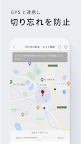
・Automatically turn the air conditioner on as you approach home.
・Set a weekly timer all at once.
〈Room Monitoring〉
・Notify you when the room temperature becomes too high or too low.
〈Air Conditioner Usage Support〉
・Displays the air conditioner utilization rate in your area and the highest set temperature.
・Provides useful information for saving energy and keeping your air conditioner clean.
*Available features may vary depending on the model.
For detailed feature information and a list of compatible models, please visit the "What You Can Do with the Eolia App" website.
https://panasonic.jp/aircon/app/feature.html
■Usage Notes
- To use this app, the following equipment and preparation are required:
1. A Panasonic air conditioner with built-in wireless LAN, or a Panasonic air conditioner connected to a wireless adapter (CF-TA9) and wireless gateway (CF-TC7 or CF-TC7B), or a wireless LAN adapter (CF-TA10)
2. An internet connection (internet line, broadband contract)
3. A wireless LAN router
- Separate communication charges apply for downloading the app and accessing the server.
- Depending on your smartphone settings and communication environment, the screen may not display correctly or some functions may not be available.
* For details on compatible models and connection methods for the Aeolia app, please visit the "Aeolia App Setup" website.
https://panasonic.jp/aircon/app/setup.html