You might like:


About this App
Productivity app
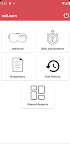
The redLearn app that has been built has 4 segments –
The first one being the redVerse which is the redBus Metaverse (a virtual reality experience). The metaverse or redVerse has two segments, one representing the office space with people seated at office; while it’s second part is an experiential redBus city created with moving traffic and buildings, where each building represents a technological/engineering team at redBus. The buildings can be explored by entering the main door which leads into an auditorium where the architectural notes of the specific engineering team are displayed along with a Byte sized learning sound bites module being played giving out information on what that team does and how it has been built. The office redVerse module helps people explore and understand remotely how the layout of our main engineering R&D center is designed along with visibility on key people within the office premise. The redVerse city helps people experience and learn interactively how the entire redBus ecosystem has been designed from a tech standpoint. Helping people assimilate information quickly; understanding important heat maps of our complex microservices based architectural setup better with availability of information represented in an interactive forum.
The second segment of the application covers a fully homegrown assessment module, where the competency framework designed for engineering teams curated in-house powers the test with backend logic based on the framework. It allows people approved by org; to select their job level and team within engineering prior to an assessment, and exhibits precise questions as per the competency requirement for the individual; which is team specific and has 5 questions per competency covered. The validated competency framework setup in the backend has level wise functional expectations set at basic, intermediate and expert; thus the questions generated and scoring logic has been set based on the same. The level of expertise needed for each level defines the number of questions which need to be answered correctly. Once the test has been taken the competencies with low scores get flagged and a get course option pops up for the assessee. On clicking this ‘get course’ option the assessee gets a list of learning courses realtime from learning sites across the internet offering free and relevant learning material for the specific competencies that they need to develop or build their skills around. The list of courses received by the individual can also be shared to their email id for better hold on tracking and completion.
The third segment of the application offers an option to analyze progress of the tests taken and look at skill wise progress data for each concluded test. This helps individuals to own their learning charter and growth. This tab also has an option for the individual to share their progress report to any senior person in order to have more meaningful career oriented conversations.
The fourth segment is a document repository which has detailed notes on each tech platform of redBus along with curated content and recordings explaining each sub-team architecture. The learning platform provides accurate information about the engineering architecture to facilitate holistic overview and understanding of upstream and downstream services and applications. This understanding helps in building seamless and coherent engineering solutions for the envisioned features.