You might like:


About this App
A complete solution for mobile security and privacy assessment.
App Permission Manager - Master Your Mobile Security.⭐ Your Ultimate Mobile App Security Tool!
🛡️ Are you tired of sneaky apps overstepping their boundaries? Welcome to the App Permission Manager Tool, where your phone's safety is our top priority! It's time to outsmart those apps and take control of your privacy.
🔍 Ever wonder which apps are playing it risky with your data? With App Permission Manager Tool, you become the detective of your device. Discover which apps are asking for more than they need and learn to grant permissions wisely.What does the App Permission Manager Tool do?
It is your personal mobile security agent, giving you a detailed rundown of all permissions used by apps on your device. With a single tap, revoke unnecessary permissions and protect your data from prying eyes. Stay informed about the permissions apps request and make smarter decisions about your privacy.
💡 Knowledge is power, and with the App Permission Manager Tool, you're in the driver's seat of your mobile security. Our app uses "Accessibility Service" to empower you to revoke permissions effortlessly.⭐ Protect your privacy with these fantastic features:
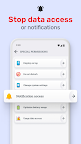
✅ App Permission Insights: Dive into a detailed view of app permissions categorized by risk level. Whether it's System apps, Recent apps, or Keep Apps, you can easily manage permissions. Want to remove a risky permission? Just toggle off and apply changes!
✅ Group Permission Detective: Target specific permissions and discover which apps can access them. Keep an eye on the apps that might get too personal.
✅ Special Permission Watchdog: Some permissions are extra sensitive. We'll highlight apps with access to settings like system changes, Do Not Disturb, and more so you can manage these with extra care.
✅ Permission Dashboard: Keep tabs on which apps access your Camera, Microphone, and Location. Stay alert with tracking notifications and know who's asking for what.
✅ Permission History: Get a comprehensive history of all permission activities. It's your personal logbook of who's been asking for access.
🔴 AccessibilityService API: To offer you the best protection, the App Permission Manager Tool requires Accessibility service. This is used strictly for permission management and dashboard functionality, always with your consent. The app requires Accessibility service to perform a task automatically and permission dashboard functionality with user consent.Make smarter decisions about your privacy!
🚀 Ready to take command of your privacy? Download the App Permission Manager Tool now and embark on a journey to smarter, safer app usage. Say goodbye to unwanted app intrusions and hello to peace of mind!