You might like:


About this App
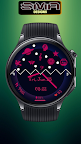
Vibrant WearOS WF Bursting with colorful elements a visual delight on your wrist
The watch face boasts a dynamic canvas, marrying elegance with vibrancy in a symphony of colors and functionality. At its core, the face presents a polished, minimalist design, ensuring clarity and ease of readability at a glance.
Overall, this watch face is a testament to the marriage of form and function, where elegance meets innovation in a dazzling display of color and creativity. With its vibrant elements and impeccable design, it's not just a timepiece; it's a work of art for your wrist.
Note:
if you see message "Your devices are not compatible", use Play Store on WEB browser.
INSTALLATION
1. Install app on your phone (only Android OS 11.0 or above)
2. Install app on your smartwatch (only Wear OS by Google)
To show the heart rate, stay still and tap the heart rate area. It will blink and measure your heart rate. The heart rate will be shown after the successful reading. The default usually showing 0 before the reading is complete.
Tap and hold the watch face and go to the "customize" menu (or settings icon under the watch face) to change the styles and also manage the complication.
Join our Telegram group for live support and discussion
https://t.me/SMA_WatchFaces
Important notes about heart rate measurement & display:
*Heart rate measurement is independent from the Wear OS heart rate application and is taken by the watch face itself. The watch face shows your heart rate at the time of measurement and does not update the Wear OS heart rate app. The heart rate measurement will be different than the measurement taken by stock Wear OS app. The Wear OS app will not update the watch face heart rate, so in order to display your most current heart rate on the watch face, tap the heart icon to measure again.
★ FAQ
Q: Do your watch faces support Samsung Active 4 and Samsung Active 4 Classic?
A: Yes, our watch faces support WearOS smartwatches.
Q: How to install the watch face?
A: Follow these steps:
1. Open the Google Play Store app on your watch
2. Search for the watch face
3. Press the install button
Custom Watch Faces
Digital Watch Face
Analog Watch Face
Watch Face Design
Personalized Watch Face
Interactive Watch Face
Smartwatch Faces
Clock Faces
Stylish Watch Face