You might like:


About this App
Simple to do list, reminders and task manager app to increase your productivity
Tasks is a beautifully simple, ad-free, and privacy-focused to do list, planner, and reminders app designed to organize your busy life effortlessly and increase your productivity. Stay on top of your daily tasks, plan projects, set reminders, and schedule events—all in one easy-to-use app.
✔ To Do List & Task Manager – Create, organize, and prioritize your tasks and increase your productivity
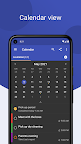
✔ Daily Planner & Calendar – Plan your day, week, and month with ease
✔ Smart Reminders – Set due dates and get timely notifications and alarms
✔ Privacy First – Your data belongs to you, no ads or trackers. Privacy as it should be!
✔ Easy Task Entry – Quick add tasks via shortcuts, persistent notification, or share from other apps. Making task entry simple and efficient.
If you ever need any help with Tasks features simply tap the Help button or check out the YouTube videos or just send am email. Support is always available.
🔒 100% Private & Secure
With Tasks, your data stays yours. It is encrypted:
✔ On your device – Secure local storage
✔ During transfer – Encrypted communication
✔ In the cloud – If synced, your data remains private (Premium only)
📝 Simple Yet Powerful To Do List
Tasks keeps things intuitive and clutter-free. Whether you need a grocery list, project planner, or daily task manager, Tasks is built for you and with additional features like filtered lists, tags and the calendar view you can view and sort your tasks your way.
✔ Create & Manage Lists – Color-code your lists and reorder with drag & drop
✔ Swipe to Delete – Fast, gesture-based controls
✔ Widgets – Stay productive from your home screen without opening the app
📅 Never Miss a Task with Smart Reminders
Set due dates and receive actionable notifications and alarms. Mark tasks as done or snooze them without opening the app. Quick, simple and easy to use.
🌟 Unlock Premium Features:
🚀 Web Access – Manage your tasks, notes & calendar from any device.
☁ Cloud Backup – Keep your to do lists safe & recoverable anytime.
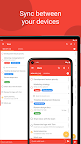
🔄 Device Sync – Access your reminders & notes across all devices.
📂 Shared lists – Collaborate with others and share lists securely between accounts.
📢 Shape the Future of Tasks!
This app is in active development—your feedback shapes future updates. Have a feature request? Send us an email.
✅ Get started today—download Tasks now and simplify your life!