You might like:


About this App
Moon phase calendar with live wallpaper, lunar widget, & 3D simulation.
Love the Moon? Get this 3-D simulation, with Atlas, Monthly Calendar, Live Wallpaper, Widget and more to track the upcoming Full Moon, New Moon, and Eclipse.
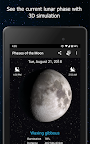
Hold the Moon in your hand with this 3-D simulation of Moon phases with data updated in real time. Swipe back and forth to move through the phases of the Moon. This app has all the data you need including moon rise and set times, moon illumination, phase name, zodiac location and the distance to the Moon, all in a beautiful, elegant app that's fun to use. It's even got a monthly calendar so you can see what the Moon will look like over time.
Key Features:
Moon Phase Alerts: Add a reminder for specific moon events or choose your own day/time. Is there a special lunar event coming up? Set an alarm in advance to ensure you don't miss the lunar eclipse, super blood moon, or wolf moon!
- Track all cycles of the moon (including full moon, new moon, waning gibbous, waxing crescent, first quarter, and more) through live moon wallpaper or through moon phase calendar app. See how the moon looks during every stage, including the total solar eclipse.
- See the current lunar phase with a 3-D simulation made by NASA data: You can even see the shadows change. Includes a Live Lunar Wallpaper and a Widget so you don't need to enter the app to always know what phase it is.
- Moon rise and moon set times: View for today or look into the past or future for updated times.
- Find the next Full Moon or New Moon: You can click a button to take you to the next Full Moon or New Moon.
Interactive and informative free moon app: Smoothly drag the Moon phase back and forth with your finger, or even "spin it" to quickly advance forward or backward. - See the current date, distance, phase name, zodiac location and moon illumination percentage: updated in real time. GPS detection of your hemisphere and location to make sure the Moon looks right for you.
- See the Moon's libration (wobble) as it completes an orbit around the Earth.
- View craters and moon landing sites: Pinch-zoom the Moon to see a full lunar atlas with spacecraft landing sites, mare, and large craters
- Share with friends: Share your images on all the popular social networks
Developed by M2Catalyst. Please email us if you have any questions or if there are any problems with your specific version of Android. We'd also love to hear your feature ideas.
Moon images created by NASA/Goddard Space Flight Center Scientific Visualization Studio
Please, support developers of this app and buy the ad-free version here:
https://play.google.com/store/apps/details?id=com.universetoday.moon.phases