

You might like:
![AE ATLANTIS [SUPER AVI] 's icon](https://img.apkz.com/gpi/orjUz4i0PdKn6TqH9gmiFl6KlKyW0TQhkZApprQSuplVaBtNJXY6cxOdQKVxko6_AI8?w=96)


About this App
Wear OS built and tested on Watch Face Studio powered by Samsung
AE ARCOM II
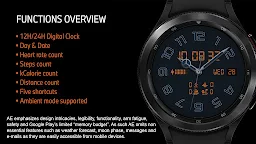
Dual mode, classic rendition with key activity complications hidden on secondary dial complementing better user experience and satisfaction of having one on the wrist.
FEATURES
• Dual mode (Dress & activity dial)
• Heartrate count (BPM)
• Steps count
• Kilocalorie count
• Distance count (KM)
• Battery progress bar
• Date
• 12H / 24H Digital Clock (on secondary dial)
• Five shortcuts
• Always ON Display
PRESET SHORTCUTS
• Calendar
• Message
• Alarm
• Heartrate
• Switch Dial (Show/Hide active dial)
REFRESH HEARTRATE
During installation, allow access to sensor data on the watch. Paired with phone app, place watch firmly on the wrist and wait a moment for the app to initialize the Heartrate or double tap the shortcut and give it a moment for the watch to measure. Refer to store listings screenshots to identify the shortcut locations.
ABOUT ALITHIR ELEMENTS
Alithir Elements holds the responsibility for the design, functions, feature and quality of this App, tested on Samsung Tizen and Wear OS watches, all features and functions worked as intended. The same may not apply with other Wear OS devices. App is subject to change for quality and functional improvements.
NOTE TO PLAY STORE SUPPORT TEAM
This Wear OS app has been updated to target Android 13 (API level 33) as instructed and the app is live. Kindly check status before sending out warning.





![AE ATLANTIS [PERPETUAL] 's icon](https://img.apkz.com/gpi/y7yz6W1WoOtw8YpNpIgxG0H6DzyoQBqm4kReJpfGwTOVtWCRWJ7XumPzHS0UF_1I7r_wAGTT_3M5Xu9cH199lg?w=96)


![AE MOTORRAD [NEXT] 's icon](https://img.apkz.com/gpi/bGCGbqcn27ekjYu8IPvoh8poL1O12q80hJZbQNnjzhdGH2FyLuNhjXVvmvMfMN-vzfvB8Hj8BH5qjG8zcr7nmg?w=96)

