You might like:


About this App
A classic analog watch face for Wear OS with a unique graphic battery indicator.
Experience a subtle evolution of classic design with the DADAM40: Classic Dial for Wear OS. ⌚ This elegant analog face honors traditional watchmaking with its clean dial and timeless hands on a deep black background. The standout feature is a unique, graphical progress bar at the bottom of the circle, offering a stylish and modern way to monitor your battery life. It's the perfect choice for those who want a sophisticated look with a touch of innovative, smart design.
Why You'll Love DADAM40:
* A Unique & Stylish Battery Bar 🔋: The standout feature! A sleek, graphical progress bar is beautifully integrated into the classic design, offering an innovative way to track your power.
* Timeless Analog Sophistication ✨: Enjoy the pure elegance of a traditional watch face, with a high-contrast black dial that looks sharp and is easy to read.
* Smart & Convenient Customization 🚀: Tailor the face to your needs with two customizable app shortcuts and a slot for your favorite data complication.
Key Features at a Glance:
* Graphical Battery Bar 🔋: A sleek progress bar integrated into the bottom of the dial provides a unique and visual way to track your battery life.
* Classic Analog Timekeeping 🕰️: An elegant and easy-to-read analog display with a traditional aesthetic.
* Two Customizable Shortcuts ⚡: Set up two tap zones for quick access to your favorite applications.
* Customizable Complication ⚙️: Add a single data widget for your most important information, like the weather or your step count.
* Date Display 📅: The current date is always visible on the dial.
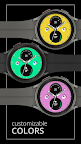
* Customizable Color Themes 🎨: Personalize the colors of the battery bar and other accents to match your style.
* Elegant & Efficient AOD ⚫: The Always-On Display maintains the classic look and black background while saving power.
Effortless Customization:
Personalizing is easy! Simply touch and hold the watch display, then tap "Customize" to explore all the options. 👍
Compatibility:
This watch face is compatible with all Wear OS 5+ devices including: Samsung Galaxy Watch, Google Pixel Watch, and many others.✅
Installation Note:
The phone app is a simple companion to help you find and install the watch face on your Wear OS device more easily. The watch face operates independently. 📱
Discover More from Dadam Watch Faces
Love this style? Explore my full collection of unique watch faces for Wear OS. Just tap on my developer name (Dadam Watch Faces) right below the app title.
Support & Feedback 💌
Have questions or need help with the setup? Your feedback is incredibly valuable! Please don't hesitate to contact me through the developer contact options provided on the Play Store. I'm here to help!