You might like:


About this App
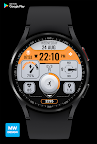
MWDesign presents Elegant Pro+ V2 Watch Face
High Quality watch face designed by MW Design.
* Full Support for the new Galaxy Watch 4 Series.
* Supports Wear OS 2.0
*Heart Rate Notes:
The watch face does not automatically measure and does not automatically display the HR result when installed.
To view your current heart rate data you’ll need to take a manual measurement. To do this, tap on the heart rate display area (see images). Wait a few seconds. The watch face will take a measurement and display the current result.
After the first manual measurement, the watch face can automatically measure your heart rate every 10 minutes. Manual measurement will also be possible.
Installation Notes:
1 - Make sure the watch is properly connected to the phone.
After a few minutes the watch face will transferred on watch : check the watch faces installed by the Wearable app on the phone.
or
2 - If you are having synchronization problems between your phone and Play Store, install the app directly from watch: search "MW" from Play Store on watch and hit on install button.
3 - Alternatively, try installing the watch face from web browser on your PC or Mac
Please consider that any issues on this side are NOT developer dependent. The developer has no control over the Play Store from this side. Thank you.
This watch face supports all Wear OS devices with API Level 28+.
Watch face features:
* 12/24H Automatic time.
* Hour, Min, Second hands (Customize to turn on/off)
* Day Of Week, Day, Month
* Battery %
* AM/PM
* AOD Mode.
* Custom Backgrounds hold down to change.
* Animated second counter
* Seconds dial
Health Data
* Heart Rate - Please read Note *Heart Rate
* Steps Count (10,000)
* Steps % Progress Bar.
* Distance Miles/KM (Changes based on region US/UK)
1xComplicatins can be changed by holding down and clicking customize.
1xShortcut Complication can be changed by holding down and clicking customize.
FAQ
Please contact us using email if you have any trouble with the app !!
You can visit my FB page for more details
https://www.facebook.com/MWGearDesigns