

You might like:
![AE MOTORSPORT [SEPANG] 's icon](https://img.apkz.com/gpi/I3l_WxfMfI05PCi_YKUcCalxeyt2dvynAMGKYB26ZgEHLLGS3exJwYiSZU2AdFbHjWs?w=96)
![AE MOTORSPORT [NIGHT RACE] 's icon](https://img.apkz.com/gpi/Mi98YRXFSV543ps6px3vreHT6YopTp-geP3Q6BH7qc7WpVKMRnml3Y_X1HUrvgrPKwFN?w=96)
![AE RAVEN [EXPEDITION] 's icon](https://img.apkz.com/gpi/8RvoNX3oLDzr0_hdSrybVHVszxa2b_F-iksa8p6K4pTkUNB9n7RaUyOcX83lG9aPbgk?w=96)


About this App
Wear OS watch face built with Watch Face Studio powered by Samsung.
AE MOTORSPORT V2
One of AE’s first designs that has 8,000 downloads in Galaxy Sore. AE Motorsport V2 is back in Play Store as a dual-mode motorsport-styled health, activity, and driving watch face.
Following through with AE’s signature dual mode where complications are tucked away on a secondary and AOD luminosity that is better than a wristwatch.
FEATURES
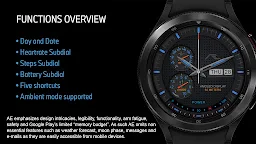
• Dual mode
• Day & Date
• Battery reserve meter
• Heartrate Subdial
• Steps Subdial
• One touch show/hide Subdial
• Five shortcuts
• Luminous Always ON Display
PRESET SHORTCUTS
• Calendar
• Message
• Alarm
• Heartrate
• Show/hide Subdial
INITIAL DOWNLOAD & INSTALLATION
During download, place the watch firmly on the wrist and ‘allow’ access to data sensors.
If the download does not take place immediately, pair your watch with your device. Long tap the watch screen. Scroll counter clock until you see “+ Add watch face”. Tap on it and look for the purchased app and install it.
ABOUT THE APP
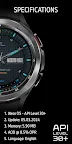
Build with Watch Face Studio powered by Samsung. Tested on Samsung Watch 4 Classic, all features, and functions worked as intended. The same may not apply to other Wear OS.




![AE ATLANTIS [PERPETUAL] 's icon](https://img.apkz.com/gpi/y7yz6W1WoOtw8YpNpIgxG0H6DzyoQBqm4kReJpfGwTOVtWCRWJ7XumPzHS0UF_1I7r_wAGTT_3M5Xu9cH199lg?w=96)


![AE MOTORRAD [NEXT] 's icon](https://img.apkz.com/gpi/bGCGbqcn27ekjYu8IPvoh8poL1O12q80hJZbQNnjzhdGH2FyLuNhjXVvmvMfMN-vzfvB8Hj8BH5qjG8zcr7nmg?w=96)

