You might like:


![[KNA015] CRESCENT 's icon](https://img.apkz.com/gpi/ti1orTMCEZwaoCbG-MDyiq7CwLLTJGZ-lYBocqpGIQ4G1crZ-k03Ck1XVG4wPP_u8mk?w=96)
About this App
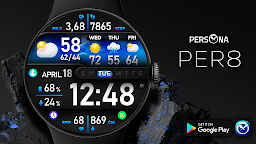
"PER8 Soho" is an animated, digital WearOS watch face designed by PERSONA
🚀 PER8 Weather Watch Face Digital is an advanced digital watch face designed for Wear OS smartwatches, offering changeable font styles, dynamic day & night visuals, stunning visuals, and forecast weather data.
Dynamic Day & Night Visuals
🌞 Day Mode: Calm and peaceful sky animation.
🌌 Night Mode: Stunning northern lights animation.
🎨 Customize your PER8 Weather WatchFace
10 font styles for time
10 backgrounds
10 line colors
20 color combinations
Closable/stoppable sky animation
Sky animation for the day display
Northern lights animation for the night display
7 custom complications
3 custom shortcuts
10 AOD Dims
🔹 Key Features of PER8 Weather WatchFace Digital
Weather type and temperature (°F / °C)
High & Low temperature (°F / °C)
Next 3 days' weather type
Next 3 days' temperature (°F / °C)
Steps, daily goal & distance (KM / Miles)
Phone & watch battery level
Active burned calories, floors
Heart rate monitor
UV index, rain possibility
Moon phase, sunset/sunrise
Time zone, barometer
Next appointment reminder
Always-On display with adjustable colors
🛠️ Easy Customization Mode
Simply touch and hold to personalize what data you see — weather, sunrise/sunset, time zone, and more.
🔋 For extra complications and widgets like phone battery, calories, or floors, please check the setup guide here:
👉 https://persona-wf.com/installation/
❓ Weather Not Updating?
Seeing a “❓” icon? That means your watch can’t get weather data. Check your internet connection and refresh the watch face.
🌙 Always-On Display (AOD)
The watch face has an always-active display. You can change the brightness level in the customization menu. There are 10 levels in total.
The colors are synchronized with the normal view.
With the new option “AOD Dim” in the customization menu, you can now change the AOD layout.
🌐 More Details:
https://persona-wf.com/portfolios/soho/
📖 Installation Guide
Before leaving a review, make sure to check the installation guide and FAQ for a smooth experience:
👉 https://persona-wf.com/installation/
⌚ Supported Devices
Compatible with all Wear OS devices (API Level 34+), including:
SAMSUNG: Galaxy Watch8 Classic, Galaxy Watch Ultra, Watch8, 7, 6, 5, 4
GOOGLE: Pixel Watch 1, 2, 3, 4
FOSSIL: Gen 7, Gen 6, Gen 5e series
MOBVOI: TicWatch Pro 5, Pro 3, E3, C2
🚀 Exceptional Support
Need assistance? We’re here for you
📩 support@persona-wf.com
💜 Join Our Community
Get the latest designs & exclusive offers
🌐 https://persona-wf.com
📩 Newsletter
https://persona-wf.com/register
https://www.facebook.com/Persona-Watch-Face
https://www.instagram.com/persona_watch_face
💬 Telegram
https://t.me/persona_watchface
▶️ YouTube
https://www.youtube.com/c/PersonaWatchFace
💖💖💖 Thank You for Choosing PERSONA!
We hope our design brightens your day and your wrist 😊
Designed with love by Ayla GOKMEN