You might like:


About this App
Experience the blend of analog & digital with the Realistic Digital WF by MANAV
* New Release: Realistic Digital Watch Face by MANAV
- Overview:
Experience the perfect blend of analog and digital with the new Realistic Digital Watch Face designed by MANAV. This watch face is crafted to bring satisfaction and style to your Wear OS device.
* Key Features:
- Modern Hybrid Design: Combines the elegance of analog with the functionality of digital.
- Color Customization: Choose from 4 unique color options with Always-On Display (AOD) mode.
- Customizable Complications: 5 fully customizable complications to fit your needs.
- Custom Shortcuts: 3 shortcuts for quick access to your favorite functions.
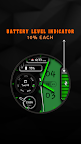
- Dynamic Battery Indicator: Stay informed with a real-time battery level indicator.
* Compatibility:
This watch face is compatible with a wide range of Wear OS devices, including:
- Samsung Galaxy Watch5 Pro, Watch4 Classic, Watch5, Watch4
- Mobvoi TicWatch Pro 4 GPS, Pro 4 Ultra GPS, Pro 4G, Pro 3, E3, E2/S2, C2
- Fossil Gen 6, Gen 5e, Gen 5 LTE, Sport, Wear OS
- Google Pixel Watch
- Suunto 7
- Casio GSW-H1000, WSD-F21HR
- TAG Heuer Connected 2020, Calibre E4 42mm, Calibre E4 45mm
- Movado Connect 2.0
- Montblanc Summit 2+, Summit, Summit Lite
- Motorola Moto 360
- Hublot Big Bang e Gen 3
- Oppo Watch
* Heart Rate Measurement:
- Manually measure your heart rate by tapping the heart rate display area.
- The watch face will automatically measure your heart rate every 10 minutes after the first manual measurement.
* Installation Instructions:
1. Ensure your watch is connected to your phone.
2. Install the watch face on your phone. After installation, press and hold the watch display, swipe to the end, and click "Add watch face" to activate it.
3. For Samsung watches: Open the Galaxy Wearable app on your phone. Under Watch Faces > Downloaded, find and apply the new watch face.
4. For other smartwatch brands: Open the watch app on your phone and find the new watch face in the gallery or list.
* Support:
For support and requests, please email manavmittal6801@gmail.com.
Explore the satisfaction of a stylish and functional watch face with the Realistic Digital Watch Face by MANAV. Download now and elevate your smartwatch experience!