You might like:


About this App
Make your motorcycle life more comfortable with the Honda RoadSync Duo App.
By connecting Honda RoadSync Duo on your smartphone and the motorcycle via Bluetooth, it offers features to enrich your electric motorcycle lifestyle such as navigation, calls, and music. You can control these features through the vehicle’s handlebar switch, helping you keep your attention on the road and your hands on the bars.
Keep track of your bike's location and stay informed with timely notifications with the Theft Alerts Service*2 and get notification when there is an unauthorized movement of your motorcycle or a fall is detected Taking care of your motorcycle is easier than ever with a periodic inspection notification and finding a dealership near you.
■ Main features include:
- Turn-by-Turn navigation with audio support*3
- EV Routing : Prepare for your ride and know how far your battery will take you and decide when and where to swap your batteries*4. Select a destination by typing location name or setting a pin.
- Theft alerts service*2 : Timely alerts of unauthorized movement or fall detection.
- Play music from your favorite streaming app*5
- Hands-free phone call operations [make, receive, and end calls]
- Redial from call history
- Access your “Favorites” list from your phonebook contacts.
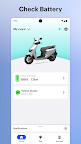
- Remote vehicle alerts will notify you if your motorcycle requires attention.
- Periodic inspection reminders to maintain your vehicle in top condition*6.
■ Compatible motorcycle models with Honda RoadSync Duo:
https://global.honda/en/roadsync-duo/
■ To enjoy extended features and easy riding, simply
1. Install the Honda RoadSync Duo app
2. Turn on your Honda motorcycle
3 Run the app and follow the instructions on the app and the vehicle!
Note: Honda RoadSync Duo requires comprehensive permissions to allow your compatible motorcycle to connect and respond to your phone's call and media apps. Connected features require tethering from your smartphone, via Bluetooth PAN or WiFi*7.
*1 Honda RoadSync Duo is a different application from Honda RoadSync.
*2 Offered only in India. Additional subscription required to enable the feature.
*3 Bluetooth or Wired headset is required.
*4 Honda Mobile Power Pack e: compatible models can use battery swapping stations in the supported regions.
*5 Supported Apps list :
India
Spotify
YT Music
Apple Music
Amazon Prime Audio
JioSaavn
Indonesia
Spotify
YT Music
Apple Music
SoundCloud
Deezer
Samsung Music
*6 Offered only in India.
*7 Your mobile operator’s data charges will apply