You might like:


About this App
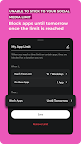
Limit apps & set app wise time limits
Discover the Power of Focus with App Limit
Struggling to restrict screen time and enhance productivity? App Limit is your go-to solution for managing distractions and improving focus. Available for Android, it’s the perfect alternative to default digital wellbeing settings, offering superior tools to set a time limit for apps and activities. Regain control over your day and experience a seamless way to limit screentime.
Why Choose App Limit?
Advanced App Limit Features: Unlike other apps, App Limit provides customizable options to set time limits for individual apps and websites, ensuring you stay productive without unnecessary interruptions.
Focus Insights: Track your daily focus levels with a Focus Score, helping you understand when you’re most productive.
Key Features
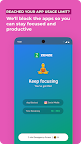
Time Limit Management: Effortlessly configure and enforce app limits. Once the set time limit is reached, App Limit automatically restricts access, ensuring you stay on track.
Restrict Screen Time: Set daily limits to restrict screen time, helping you create more opportunities for offline activities and focused work.
App Limit Scheduling: Schedule app limits during working hours, breaks, or sleep times for optimized daily routines.
Community and Rewards: Join others in a vibrant community to climb leaderboards and unlock rewards for successfully restricting screentime.
Tailored for Productivity Seekers
Looking for an app to help you limit screentime? App Limit is designed with advanced features to help you manage distractions and enforce app limits. It’s the perfect choice for Android users seeking a focused, balanced digital lifestyle.
Private & Secure
Your privacy is a priority. App Limit uses secure Android Screen Time Usage data to enforce time limits and app limits without compromising your personal information.
VpnService (BIND_VPN_SERVICE): This app uses VpnService in order to provide an accurate content blocking experience. This permission is required in order to block adult website domains & enforce safe search on search engines at the network. However, this is an optional feature. Only if the user turns on "Block Adult Websites" - VpnService will be activated.
Accessibility services: This app uses the accessibility service permission (BIND_ACCESSIBILITY_SERVICE) to block websites based on websites and keywords selected by the users. System alert window: This app uses the system alert window permission (SYSTEM_ALERT_WINDOW) to show a block window over websites selected by the users to be blocked.
Ready to Transform Your Screen Time?
Download App Limit today to restrict screen time, regain control, and achieve more. Join thousands who have embraced focus and productivity by setting smart time limits with App Limit!