You might like:


About this App
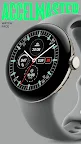
Analog Racing-Inspired chronometer watch face with customizable complications
Accelmaster is a bold and highly informative analog watch face, blending the classic racing chronometer aesthetic with modern graphic design. It’s designed for users who appreciate both style and functionality, offering a dynamic yet minimalist look for your Wear OS device.
Wear OS App Features:
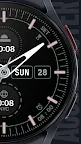
- Seven Customizable Complications: Accelmaster provides seven customizable complications around the dial, along with day and date information. Three circle complications are positioned in the center of the watch face for easy access to important data, while four outer dial complications maintain a sleek and clutter-free look.
- 30 Color Schemes: Choose from 30 vivid color schemes to match your personal style and enhance the visual appeal of your watch face.
- Customizable Hands & AoD Modes: Personalize your watch with 10 unique hand designs, including separate customization options for the second hand. Additionally, Accelmaster offers five Always-On Display (AoD) modes to keep your watch face visible while conserving battery life.
- Advanced Customization: Further refine the appearance of your watch face with multiple options for the dial elements, hands, and complications, allowing you to create a look that is uniquely yours.
Android Companion App Features:
The optional Android companion app makes it easy to discover and install new watch faces from the Time Flies collection. You’ll receive updates on the latest releases and notifications about special deals, simplifying the process of finding the perfect watch face for your wearable device.
About Time Flies Watch Faces:
Time Flies Watch Faces is committed to delivering a great watch face experience for your Wear OS device. All our watch faces, including Accelmaster, are crafted using the modern Watch Face File format, ensuring optimal energy efficiency, performance, and security. This allows you to enjoy all the features of your smartwatch without sacrificing battery life or functionality.
Inspired by the timeless craft of watchmaking, we combine classic design elements with modern technology to offer watch faces that are both elegant and cutting-edge.
Key Highlights:
- Modern Watch Face File Format: Guarantees better energy efficiency, performance, and security.
- Inspired by Watchmaking History: Designs that reflect the craftsmanship and elegance of traditional watches.
- Customizable Designs: Tailor your watch face to your personal style with extensive customization options.
- Adjustable Complications: Choose the information you want to display with fully customizable complications.
At Time Flies, we regularly update our collection to bring you fresh designs and new features, ensuring that your smartwatch experience remains exciting and personalized.
Download Accelmaster today and elevate your smartwatch style with a sleek, racing-inspired design. With Time Flies Watch Faces, your smartwatch experience is set to soar.