
About this App
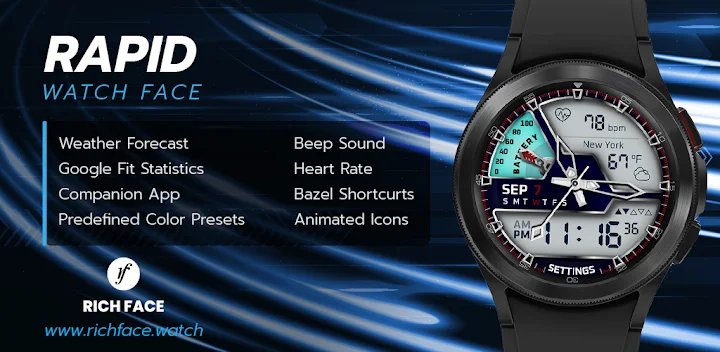
A clean well-designed, customized, classic watch face for WearOS smartwatches
★ Rapid Watch Face is fully Wear OS 3.0 supported
A clean well-designed watch face with new additional features such as Bezel shortcuts, beep sound on every hour, auto HR, etc...
This watch face supports only WearOS by Google.
NOT SUPPORTED: Samsung S2/S3/Watch on Tizen OS, Huawei Watch GT/GT2, Xiaomi Amazfit GTS, Xiaomi Pace, Xiaomi Bip, and other watches.
The watch face, currently, doesn't support Samsung Health
★ How to select a complication in the desired position ★
- Long tap on the watch face
- System shows the icon "gear" for the watch face settings. Tap on it.
- Select the "Customize" option
- Select "Complications" option
- Select the desired position
- Select built-in complication or
- Select "External Complication"
• Select any third-party complication
You are ready to go.
★ NEW options ★
• Vibrate every hour
• Beep sound on every hour
• Auto HeartRate monitor
• Bezel shortcuts:
• Alarm
• Settings
• Find phone
• Stopwatch
• Map *(Google Map needs to be installed on the smartwatch)
• Flashlight
• Timer
★ NEW Bezel shortcuts ★
Bezel shortcuts give you more options to add to your screen without removing any of the current complication positions
Currently, we are supporting followed shortcuts:
• Alarm
• Settings
• Find phone
• Stopwatch
• Map *(Google Map needs to be installed on the smartwatch)
• Flashlight
• Timer
★ Wear OS 3.0 support!
• Fully standalone! (iPhone and Android compatible)
• External complication data for the indicators
★ Compatible with all WearOS smartwatches
• External complications
• Change color
• 24-hour format
• Leading zero
• Screen time
• Forecast
• Full ambient mode option
• Change color preset on tap
• Tap indicator
• Google FIT integration
• Weather settings (location, providers, frequency update, units)
• ★ NEW! Bezel shortcuts
• Beep sound on every hour (hour chime)
• Vibrate every hour
Google Fit complications (requires Google Fit authorization) :
• Steps
• Distance
• Walking
• Running
• Biking
• Calories
• Fit statistics
• Water counter
• Coffee counter
★ Device sensor complications:
• Heart Rate monitor complication
• Built-in Steps counter complication
★ FAQ
Q: Do your watch faces support Samsung Active 4 and Samsung Active 4 Classic?
A: Yes, our watch faces support WearOS smartwatches.
Q: How to install the watch face?
A: Follow these steps:
1. Open the Google Play Store app on your watch
2. Search for the watch face
3. Press the install button
Q: I bought the app on my phone, do I have to buy it again for my watch?
A: You should not have to buy it again. Sometimes the Play Store takes a bit longer to figure out that you already bought the app. Any additional order will automatically be refunded by Google, you will receive the money back.
Q: Why I can not see steps or activity data in a built-in complication?
A: Some of our watch faces come with Built-in steps and Google Fit steps. If you select built-in steps, ensure that you grant activity recognition permission. If you select Google Fit steps complication, please use the watch face companion app where you can grant permission on Google Fit to log your data.
Note also that Google Fit sometimes won’t show your real-time data due to its caching sync issues. We are also working to implement Samsung Health for Samsung phone devices
★ Other FAQ find here:
https://richface.watch/faq
!! Please contact us if you have any trouble with the app !!
richface.watch@gmail.com
★ PERMISSIONS Explained
https://www.richface.watch/privacy


