You might like:


About this App
On Track helps you to pace yourself to meet your daily activity goals
On Track calculates what you should have achieved by the current time of day to be on schedule, and compares this with your actual achievement so far. It does this for energy (calories or kJ), steps, distance and floors.
On-Track Calculation
Calculation of the activity level you should have achieved by the current time (your ‘on-track’ value) assumes:
• Before and after your active period, you don’t do anything.
• During your active period, you’re active at a constant rate that gets you to your goal. (This even applies to your energy goal: although your body will continue to burn energy after your active period, you won’t need to do any more activity to ensure that you reach your daily goal by midnight.)
App
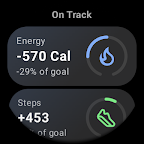
On Track shows a card for energy, steps, distance and floors. Each card states the amount by which you are currently ahead of track, and also also expresses that figure as a percentage of your daily goal. A gauge presents that information graphically: if you’re ahead, a progress line will extend clockwise from the top; if you’re behind, it will extend anticlockwise.
Touching a card displays your current achievement, current track and daily goal. For energy including BMR, you will also see the current ‘coast’ value: the level that would ensure you meet your daily goal even if you don’t do any more activity today. The rightmost values are differences from your current achievement.
Below the table is a graph. The dotted line is your on-track value throughout the day, the solid orange line is the coast value, and the dot marks your current achievement.
Settings
When entering goals, specify daily totals (eg, steps per day).
The energy goal should include your Basal Metabolic Rate (BMR) rather than just active calories, even if you turn off the ‘Include BMR’ setting. This is the figure that’s available from the Fitbit app and equivalent sources. Internally, On Track will adjust your energy goal taking the ‘Include BMR’ setting into account.
The ‘Gauge Ranges’ settings let you specify the value that corresponds to the maxima that can be displayed by the gauges. For example, if this setting is 50% and you’re currently 25% of your goal ahead of track, the gauge indicator will be half way towards the maximum positive position. You can specify a different range for the energy gauge because, if you include BMR, you won’t tend to get very far from your schedule (because you’ll be consuming energy at BMR whether you’re active or not, so your daily goal is much higher).
Complications
On Track provides four types of complications: Energy ahead, Steps ahead, Distance ahead and Floors ahead. You can show one or more of these in your watch face if the face supports range-based complications.
If you are exactly on track, a complication will display an indicator dot at the top (12 o’clock position) of the gauge arc. If you’re ahead of track, the dot will be moved clockwise around the right side of the arc, and ▲ will be displayed below the value. If you’re behind track, the dot will be moved anticlockwise around the left side of the arc, and ▼ will be displayed below the value.
On Track’s complications automatically update every five minutes, which is the most frequent interval that Wear OS permits.
If you touch an On Track complication, the On Track app will open. This lets you see additional data and make changes to On Track’s settings. When you close the app, On Track complications will be updated.
If a complication says ‘SEE APP’, this indicates that On Track doesn’t have the necessary permission and/or settings to allow calculation of the value to display. Touch the complication to open the app, touch the settings icon, and provide the missing requirements.
Tiles
On Track provides tiles for Energy ahead, Steps ahead, Distance ahead and Floors ahead.
Web Site
For more information, see https://gondwanasoftware.au/wear-os/track