You might like:


![[KNA002] SHINE 's icon](https://img.apkz.com/gpi/HYtcBfdbRJFqpzqyj7byfnIkcf0BHii-bT4ZIZTlc5F6hT6oT_0fEkdtMahkuUOecQ?w=96)


About this App
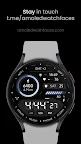
Premium hybrid design. Choose between analog & digital. Many customizations.
Only for Wear OS API 28+ devices
// Not suitable for rectangular watches
Powered by Watch Face Format
amoledwatchfaces.com
BUY ONE GET ONE OFFER!
amoledwatchfaces.com/bogo
FEATURES
• Watch Face Format 1
• premium, high quality design
• many style configurations - make your own style !
• 10x10 gradient color styles + 25 overall color styles
• HYBRID release - choose between digital / analog - option to hide watch hands !
• PNGQuant optimized layers > battery friendly
• 1x SHORT_TEXT custom complication
• ambient mode with low OPR & adaptive color & three styles
• many app shortcuts
USER CONFIGURATIONS
• Watch Hands (Talon, Digital mode (no watch hands), Outback-Catalyst hands)
• Battery Bar - Gradient (10x)
• Steps Bar - Gradient (10x)
• Distance Units (KM / MILES)
• AOD Style (dimmed down, time only + index, time only)
• Colors (25x)
• Complications / app shortcuts
APP SHORTCUTS
• APP1 / APP2 - custom app
• heart rate - measure heart rate
• date - open calendar
• battery % - open battery info
+ other shortcuts on index
Installation and troubleshooting guide
amoledwatchfaces.com/guide
Please send any issues reports or help requests to our support address
support@amoledwatchfaces.com
Join our Telegram group for live support and discussion
t.me/amoledwatchfaces
Newsletter
amoledwatchfaces.com/contact#newsletter
amoledwatchfaces™ - Awf