You might like:


About this App
Your mate to download all videos from social & web. Fast, private & HD quality!
Meet ClipMate: All Video Downloader, your smart and reliable mate for effortlessly saving any video from popular social media platforms and websites. Build your personal offline video collection and watch your favorite clips anytime, anywhere!
ClipMate is more than just a downloader; it's a powerful video manager designed to provide the fastest, most secure, and highest quality experience.
✅ Why Choose ClipMate?
🚀 High-Speed Multi-threaded Downloads: Experience blazing-fast downloads powered by multi-threading technology.
💎 Stunning HD/4K Quality: Never compromise on quality. Download videos in their original resolution, with support for HD, Full HD, and 4K.
🌐 Browse & Download Smartly: Surf the web with the built-in browser, and ClipMate will auto-detect videos, letting you download them right from the page.
🔒 Ultimate Privacy & Security: Keep your downloaded videos safe. Organize them into folders and lock them with a private passcode.
🔗 Wide Source Support: Easily save videos from your favorite social media platforms and most websites across the internet.
✨ Outstanding Features:
⬇️ Multi-task & Background Downloading: Download multiple files simultaneously and keep them downloading even when the screen is off or you're using other apps.
▶️ Smart Video Player: Play all your downloaded videos with advanced controls like playback speed adjustment and loop mode.
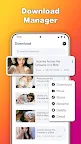
📂 Efficient File Manager: Easily organize, rename, and manage all your downloaded videos and files in one place.
🔐 Secure Passcode Folders: Create private, password-protected folders to store and hide your sensitive videos.
⚙️ Quality Options: Choose the perfect resolution (480p, 720p, 1080p, 4K) to balance video quality and storage space.
🎬 How to Use in 3 Simple Steps:
1. Browse websites with the built-in browser or paste the video link.
2. ClipMate will auto-detect the video. Just select your desired quality and tap the download button.
3. Done! Enjoy your videos offline from the "Files" tab.
⚠️ Important Disclaimer:
- This app is not affiliated, authorized, or endorsed by any social media platform.
- Users are solely responsible for ensuring they have the right or legal permission to download and use any content.
- Unauthorized downloading or sharing of copyrighted material may violate laws or platform policies.
- Please respect copyright and always seek permission from the content owner before you repost.
- This app is independently developed and is not associated with any of the social media platforms mentioned.
- Due to the Google Play Store policy, this app does not support downloading content from YouTube and is intended for personal and lawful use only.