You might like:


About this App
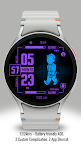
Retro-futuristic Digital watchface for Wear OS,blending adventure&survival vibes
Immerse yourself in a unique and captivating post-apocalyptic world filled with retro-futuristic technology through this watchface. Inspired by the iconic interface of a versatile handheld device commonly used by inhabitants of underground shelters, this watchface features a cheerful and optimistic character, who embodies preparedness and resilience in the face of any challenge.
With a design that mimics the interface of a multifunctional handheld device, this watchface allows you to experience the sensation of stepping into a world brimming with adventure, exploration, and advanced technology. Features such as personalized stat displays, health indicators, and intuitive navigation provide a user experience reminiscent of a device designed to enhance the quality of life for its users.
This watchface is perfectly suited for modern wearable devices, offering a blend of retro-futuristic aesthetics and practical functionality. With its detailed and character-rich design, you’ll feel as though you’re carrying a piece of a world filled with stories and mysteries on your wrist. Embrace the feeling of being part of a universe that combines technology, survival, and the spirit of exploration—all at your fingertips.
ARS Pip Walk for Your Watch. Supports Galaxy Watch 7 Series and Wear OS watches with API 30+. On the "Available on more devices" section, tap the button beside your watch on the list to install this watch face.
Features :
- Change Colors Styles
- Complications
- Animation
- 12/24 Hours Support
- Always on Display
After the watch face is installed, activate the watch face by these steps :
1. Open watch face selections (tap and hold the current watch face)
2. Scroll to the right and tap "add watch face"
3. Scroll down on the downloaded section
4. Tap the newly installed watch face