Featured Banner
Icon

ARS Techno Blaze

© Arsanna Studio

423

Source: Google Play Store

Category: Personalization

Price: USD 0.99

Content Rating: for everyone

Requires: Android 1.0+

Released on: 2025-10-09

[apkz.com] do not include Paid App , please go to Google Play to buy it.

(The more people request, the faster it may be included)

☑ We will notify you as soon as the App is available. If you can't receive notifications, please check back often.

About this App

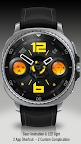
ARS Techno Blaze: a bold Wear OS analog watch face for tech enthusiasts
newly update : change battery indicators colour themed to match the numbers so the battery indicator becomes readable when in the darker modes. The Preview and icon will update later on.

Step into the future with the ARS Techno Blaze, a watch face designed for the modern-day tech enthusiast. This dynamic and visually striking watch face combines a bold, industrial aesthetic with clear, easy-to-read information. The centerpiece features large, stylized numbers at the 12 and 6 o'clock positions, with bright orange accents that pop against a dark, brushed metal background. The sub-dials for seconds and battery life are designed to resemble analog gauges, giving you a quick and intuitive read on your watch's vital stats. An additional display for steps completed helps you stay on top of your fitness goals, while a subtle heart icon adds a touch of personalization.

The ARS Techno Blaze is built for customization. While the default design showcases a vibrant orange and black color scheme, you have the freedom to switch out the accent colors to match your mood or style. The bold numerals and sub-dial indicators can be transformed to a variety of colors, allowing you to create a look that's uniquely yours. Whether you prefer a sleek, minimalist blue, a fiery red, or a cool green, this watch face adapts to your preferences, ensuring a perfect blend of high-tech functionality and personal expression.

Screenshots

I'm not a robot

In order to block spam bots, we push you a notification with the following code. Please click on the notification to complete the verification.


Notifications may be slightly delayed, please wait a moment.

Or if your device is unable to receive notifications, you can also send us an email.

Tips:

Please allow [apkz.com] to show notifications. We will notify you as soon as the App is ready.

Um, Seems that the notification is not available.
Would you like to send requests and receive updates via email?

Tips:

After the download is successful, please use [APKZ App] to install it.


Unable to determine whether the file was saved successfully, please confirm it yourself before installing.

Tips:

Your browser is out of date and some features may not work properly, please change or upgrade your browser.


For a better user experience, it is recommended to use Google Chrome or Edge.

Tips:

If the download cannot be completed, please open this page in your browser.


For a better user experience, it is recommended to use Google Chrome or Edge.

Tips:

This App can only be installed on Android devices.