You might like:


About this App
Bloom Your Way to Wellness!
Bloom Your Way to Wellness
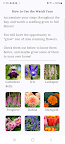
Wanna “grow” a beautiful flower on your watch? Accumulate your steps throughout the day to cultivate a flower from seed to full bloom and achieve your daily step goal!
A Daily Floral Surprise
You will have the opportunity to “grow” one of nine stunning flowers from a seed: Cathedral Bell, Iris, Peony, Marigold, Salvia, Larkspur, Foxglove, Dahlia, and Tulip. Each day, it will be a pleasant surprise since you won't know which species is blossoming until it reaches its full bloom.
Experience the joy of nurturing a living thing while staying active. Every step you take brings your flower closer to full bloom, providing a constant source of motivation and joy. These mysterious and beautiful messengers from nature are here to support your fitness journey!
#health #fitness #activity-tracker #weight-loss #step-tracker #flower #nature
Compatible with Wear OS 3 and above, with 2 complication slots for your favorite complications.
Note: on some earlier Wear OS versions, the steps may not be correctly displayed right after you edit complication slots. Restart the watch shall fix it.
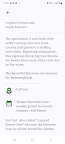
# How to set your own daily step goal #
Samsung watches:
- Open Samsung Health app, scroll to and tap "Steps", tap "Settings" (or the three dots), tap "Step target", adjust from there and save.
Pixel watches:
- Open Fitbit app on your phone, click "You" at the bottom navigation panel, scroll to "Goals", tap "Activity", find "Steps" and click, adjust from there and save.
You may want to sync data to your watch via Galaxy Wearable or Google Pixel Watch app after you set your new goal.