You might like:


About this App
The simplest way to get the chords. For guitar, piano, ukulele and more.
Chord ai uses recent advances in artificial intelligence (ai) to give you the chords of any song automatically and reliably. You won't need to look for the chords of a song on the web anymore!
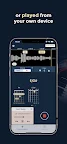
Chord ai listens to the music played from your device, from any video/audio streaming service or played live around you, and detects the chords instantly. Then it shows you the finger positions to play the song on your Guitar, Piano or Ukulele.
It is a great tool for a novice to learn his favorite song and for an experienced musician to transcribe the details of a song when rare chords are played.
Chord ai includes:
- Chord recognition (more precise than all other apps)
- Beats and tempo detection (BPM)
- Tonality detection
- Lyrics recognition and alignment (karaoke-like alignment)
Chord ai has a FREE version, enabling the recognition of basic chords:
- major and minor
- augmented, diminished
- 7th, M7th
- suspended (sus2, sus4)
In the PRO version, you can store playlists, and backup on your drive, and the chord recognition has more precision. It provides an optimal finger position and recognizes thousands of advanced chords such as:
- power chords
- half-diminished, dim7, M7b5, M7#5
- 6th, 69th, 9th, M9th, 11th, M11th, 13th, M13th
- add9, add11, add#11, addb13, add13
- 7#5, 7b5, 7#9, 7b9, 69, 11b5, 13b9,
and combinations of the above! (such as 9sus4, min7add13 etc.)
- chord inversions such as C/E are also included
Chord ai also comes with a massive library of chord positions for guitar and ukulele players. It is the ultimate guitar learning tool. Guitar tabs are not yet supported but it will come eventually.
Chord ai even works offline and it is full privacy preserving. You don't need an internet connection (unless you want to play a song from some video or audio streaming services).
How does Chord ai work? Chord ai can track the chords of a song in three ways:
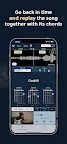
1) Through your device microphone. Any song playing around you, or played by your device, is analyzed through your device microphone and the chord positions are shown in real time. You can go back in time and replay the song with the chords displayed on a timeline.
2) For audio files that you have on your device, Chord ai will process the file in a few seconds chordifying this whole song at once.
3) Chord ai is compatible with the common audio and video streaming services.
Any feedback is appreciated at: android.support@chordai.net