你可能喜歡:


關於這個應用
想發什麼都可以, 想在哪兒發都可以
Send Anywhere:簡單,快捷,無限制的文檔共享
【2017/5/23】
Send Anywhere,被所介紹!
https://www.kocpc.com.tw/archives/147276
▶功能
•傳送任何類型的文檔,不需變更原始文檔
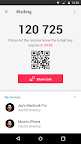
•您只需一個一次性6位數密鑰即可傳送任何文檔
•Wi-Fi直連:無需使用數據或者網絡連接即可傳送文檔
•可通過社交媒體應用或即時簡訊應用便捷地分享鏈接
•增強型文檔加密(256位)
▶什麼時候適合使用《任意地點隨心發》
•當您將照片,視頻和音樂傳送到您的電腦時!
•當您沒有數據連接或者互聯網連接弱時
•任何時間只要您想即時發送文檔都可以!
*在使用本應用時,如果出現任何問題或者錯誤,請通過“設定”裡的“發送反饋”告訴我們
-
APK File
• The copyright of applications sent through Send Anywhere belong to the application’s developer. If sharing an APK file conflicts with current copyright laws then all responsibility falls upon the user.
• Typically, you will not be able to share APK files between OS and Android. First check with application’s developer before cross-platform transfers.
Video Files
• Depending on the video type received, the video may not be pushed into the phone’s gallery. In this case, using a file management application will play the video.
• If you can’t play the videos received, download a different video player that is compatible with the video format.
-
To best use Send Anywhere’s convenient file sharing service, we ask user’s permissions listed below
• Write External Storage : To store files that are received through Send Anywhere in external storage (SD Card).
• Read External Storage : To send files stored in external storage through Send Anywhere.
• Record Audio : To recognize a sound wave and receive files.
• Get Accounts : To set default profile name when using Send Anywhere for the first time.
• Read Contacts : To send contacts stored in your phone.
• Camera : For being able to receive files via a QR Code.
For more information about our terms and policies, please visit our site.
https://send-anywhere.com/terms
https://send-anywhere.com/mobile-privacy/privacy.html