You might like:


About this App
A digital watch face that brings a touch of illuminated style to your wrist
✨ EXD159: Lumina Bar for Wear OS- Illuminate Your Time ✨
Introducing EXD159: Lumina Bar, a strikingly modern digital watch face that brings a touch of illuminated style to your wrist. With its distinctive vertical bar design and customizable features, this watch face allows you to stay informed and express your individuality with a vibrant and clear display.
Key Features:
⌚ Clearly Illuminated Digital Clock: Effortlessly read the time with a prominent digital display. Choose between the familiar 12-hour format or the precise 24-hour format to match your preference.
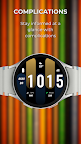
⚙️ Personalize Your Information with Customizable Complications: Tailor the watch face to display the data that matters most to you. Add up to 5 customizable complications to view information such as:
- Battery status
- Daily step count
- Real-time heart rate
- Current weather updates
- Upcoming calendar appointments
- And many other useful data points supported by your smartwatch.
🎨 Match Your Style with Vibrant Color Presets: Instantly transform the look of your watch face with a selection of thoughtfully designed color presets. Find the perfect hue to complement your outfit, your mood, or any occasion.
🔆 Always On Display for Constant Visibility: Stay connected at a glance. The efficient Always On Display (AOD) mode keeps essential information visible without requiring you to fully wake your watch, all while being optimized for battery conservation.
Experience the Lumina Difference:
- Unique and eye-catching vertical bar design.
- Excellent readability for time and complications.
- Intuitive customization options for a truly personal experience.
- Optimized for smooth performance and battery efficiency.
- Regular updates to bring you new features and enhancements.
Easy Installation:
1. Open the Google Play Store app on your smartphone.
2. Search for "EXD159" or browse the Wear OS watch face category.
3. Tap "Install" and follow the simple on-screen instructions.
4. Once installed, long-press on your current watch face on your smartwatch and select "EXD159: Lumina Bar" from the available options.
5. Customize the watch face to your liking through the watch face settings on your smartwatch or the companion app (if provided).
Shine Bright with EXD159: Lumina Bar. Illuminate your wrist with style and information!