You might like:


About this App
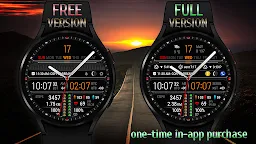
Unique digital watch face with dual time and lots of information.
The watch face has a simple high-tech style design for the best display of information.
Some of the functions of the watch face are available for free,
FULL functionality available with a one-time in-app purchase.
This watch face is available on devices running Wear OS 2.4 and 3+ (API 28+), primarily the Samsung Galaxy Watch 4/5/6 & Google Pixel Watch/2.
Devises running Huawei Lite OS and Samsung Tizen NOT SUPPORTED.
The watch face shows digital time, date, battery level, sunrise or sunset time, nautical twilight time, moon phase, moonrise or moonset time, steps and distance traveled, heart rate, history of heart rate measurement and upcoming event.
Available in 5 clock hands, 7 color themes and 8 colors of time symbols.
There are two progress bars on the watch face - steps to the goal and battery level.
The watch face also displays additional digital time for the selected time zone. You can select the time zone in the watch face settings menu.
In the watch face settings, you can set the stride length according to your height. This will help for a more accurate calculation of the distance traveled.
The area containing settings and alarm shortcuts can be replaced with any app shortcuts you like.
The upper area for complications is not filled by default. Customize it if necessary through the watch face menu.
🚩 IMPORTANT NOTES
• After installing the watch face, you need to install application shortcuts and complications widgets as you wish.
• This watch face independently measures your heart rate. This watch face does not receive data from stock Wear OS heart rate apps.
• All information about sunrise / sunset and moonrise / moonset, etc. is calculated by the watch face independently of stock apps.
• To calculating the sunrise / sunset and moonrise / moonset you need to enable the "Location" option on both the watch and the smartphone.
Functionality
✔ - available for free
💲 - available with a one-time in-app purchase
✅ WORLD TIME
✔ Digital time (UTC)
✔ Time zone code and name
✔ Difference in hours from GMT
💲 Possibility to choose a time zone
✅ TIME & DATE
✔ Digital time (12h and 24h modes)
✔ Date, month, day of the week
💲 Day of the year, week of the year
✅ SUN & MOON
💲 Sunrise / sunset times
💲 Nautical twilight times (BMNT / EENT)
💲 Moonrise / moonset times
✔ Moon phase
✅ CUSTOMIZATION
💲 5 clock hands
💲 7 color themes
💲 8 colors of time symbols
💲 2 area for complication widget
💲 2 customizable app shortcut
✅ STEPS
✔ Steps count
✔ Progress of steps towards the goal
💲 Configurable goal of counting steps
💲 Ability to select an application to receive the number of steps
✅ MOVED DISTANCE
✔ Moved distance (km or miles)
💲 Configurable stride length depending on your height
✅ HEART RATE
✔ Heart rate BPM
✔ Color-coded heart rate indicator (low, normal, high)
💲 Automatic heart rate measurement
💲 History of heart rate measurements
✅ MISC
✔ Battery level
✔ Upcoming event
✔ Moon phase
✔ Unread notification count
✔ Handling system icons
✔ Multilingual (supports more than 40 languages)
➡ We are in social media
• Telegram - https://t.me/futorum
• Instagram - https://instagram.com/futorum
• Facebook - https://facebook.com/FutorumWatchFaces
• YouTube - https://www.youtube.com/c/FutorumWatchFaces
✉ If you have any questions, please contact us by e-mail support@futorum.com
We will be happy to assist you!