Featured Banner
Icon

One Key: password manager

© GByte

4.4 217514

Source: Google Play Store

Category: Productivity

Price: Free

Content Rating: for everyone

Requires: Android 6.0+

Released on: 2015-06-06

This App is not yet included in [apkz.com]. You can click the button below to request.

(The more people request, the faster it may be included)

☑ We will notify you as soon as the App is available. If you can't receive notifications, please check back often.

About this App

Completely offline, Ad free, Fingerprint and Backup capable password manager
A simple and safe offline password manager that enables you to store all your passwords encrypted at one place on your device. Best Password Manager!

Primary Features:
■ Access all encrypted data with a single MASTER PASSWORD
■ NO INTERNET ACCESS of any sort required
■ Strongest Encryption using AES-256 bit algorithm
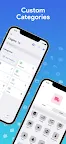
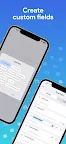
■ Custom categories and custom fields
■ Generate OTP/MFA codes
■ Completely AD-FREE
■ Auto-fill all passwords
■ Export/Import CSV feature
■ Backup/Restore capable
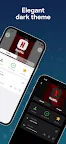
■ Dark theme

All Features:
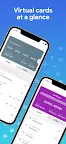
■ Virtual cards generation based on information
■ Store Credit Card details, Website logins, e-Banking logins and other details
■ Recycle bin to restore or permanently erase all deleted passwords
■ Custom categories and custom fields
■ Backup and Restore capable
■ Block Screenshots
■ Different colored card types for convenience
■ Beautiful animations and Dark theme
■ Passwords are stored using strong AES-256 encryption
■ Easy Search and Sort
■ Password Strength indicator to help you choose strong passwords
■ AUTO-LOCK on screen turn off
■ Password Generator Feature lets you create strong passwords
■ Ad-Free

Permissions explained:
■ Run at startup - To enable auto-backup on device restart
■ Storage - To securely store all passwords on your device
■ Google play license check - For in-app purchases

Screenshots

I'm not a robot

In order to block spam bots, we push you a notification with the following code. Please click on the notification to complete the verification.


Notifications may be slightly delayed, please wait a moment.

Or if your device is unable to receive notifications, you can also send us an email.

Tips:

Please allow [apkz.com] to show notifications. We will notify you as soon as the App is ready.

Um, Seems that the notification is not available.
Would you like to send requests and receive updates via email?

Tips:

After the download is successful, please use [APKZ App] to install it.


Unable to determine whether the file was saved successfully, please confirm it yourself before installing.

Tips:

Your browser is out of date and some features may not work properly, please change or upgrade your browser.


For a better user experience, it is recommended to use Google Chrome or Edge.

Tips:

If the download cannot be completed, please open this page in your browser.


For a better user experience, it is recommended to use Google Chrome or Edge.

Tips:

This App can only be installed on Android devices.