
You might like:


About this App
Customizable Wear OS 5 watch face for diabetics to track glucose, IOB, and more.
GDC-997A Diabetes Watch Face: Your Essential Diabetes Companion
Only for Wear OS 5+ devices
Powered by Watch Face Format
AI Assisted Design
Stay informed and empowered with GDC-997A Diabetes Watch Face. Designed for Wear OS 5 devices running API 34+, this innovative watch face offers a convenient way to monitor your glucose levels, insulin-on-board (IOB), and other vital health metrics directly from your wrist.
Key Features:
Real-time Data: View glucose levels, insulin-on-board, steps, and heart rate in real-time.
Customizable Complications: Tailor your watch face to your needs by adding or removing complications.
Seamless Integration: Connect with compatible data providers like GlucoDataHandler and Blose to access accurate glucose and IOB data.
Why Choose GDC-997A Diabetes Watch Face?
Enhanced Convenience: Keep track of your diabetes management essentials without fumbling for your phone.
Personalized Monitoring: Customize your watch face to display the information most important to you.
Accurate Data: Benefit from reliable glucose and IOB data integrated from trusted sources.
Special Instructions:
This face was designed and tested to use the GlucoDataHandler and Blose complication both apps available on Google Play Store
Key Features
Time & Date
-Hours (12 & 24)
-Minutes
-Seconds
-Month
-Day
-Date
Activity and Fitness
+Heart Rate
-Icons and Colors change based on Heart Rate
+Steps
-Icon color changes as percentage of step goal increases
Complications
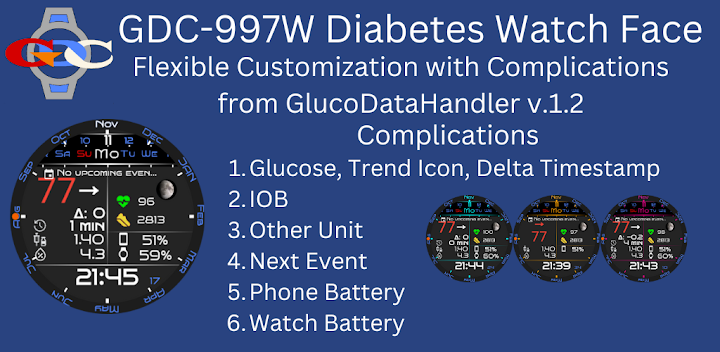
Complication 1 - Large Box
Long Text - [Text, Title, Image & Icon]
Intended = Glucose, Trend Icon, Delta & Time Stamp provided by GlucoDataHandler v 1.2
Complication 2 - Line
Short Text - [Text]
Intended = IOB provided by GlucoDataHandler
Complication 3 - Line
Short Text - [Text]
Intended = Other Unit provided by GlucoDataHandler
Complication 4 - Large Box
Long Text - [Text] & [Icon and Text]
Intended = Next Event
Complication 5 - Line
Short Text - [Icon & Text]
Intended = Phone Battery provided by amoledwatchfaces TM
Complication 6 - Line
Short Text - [Icon & Text]
Intended = Watch Battery provided by amoledwatchfaces TM
Important Note:
Informational Purposes Only: GDC-997A Diabetes Watch Face is not a medical device and should not be used for medical diagnosis, treatment, or decision-making. Always consult your healthcare provider for any health-related concerns.
Privacy Policy
As required by Google for - Apps that do not access any personal and sensitive user data must still submit a privacy policy.
Personal Information: We do NOT collect or track any Personal Information about you. “Personal Information” refers to identifiable information such as your name, address, calendar entries, contact details, files, photos, email, etc.
Third-Party Apps/Links: Our Google Play store includes links to third-party applications, such as Glucodatahandler for mobile and Wear OS. We are not responsible for the privacy practices of these third parties and recommend that you review their privacy policies.
Health App Data Privacy: Your privacy is our priority. We do not track, store, or share your diabetes or health-related data.
Bless Your Heart Google!!!
Download GDC-997A Diabetes Watch Face today and take control of your diabetes management.


