
You might like:


About this App
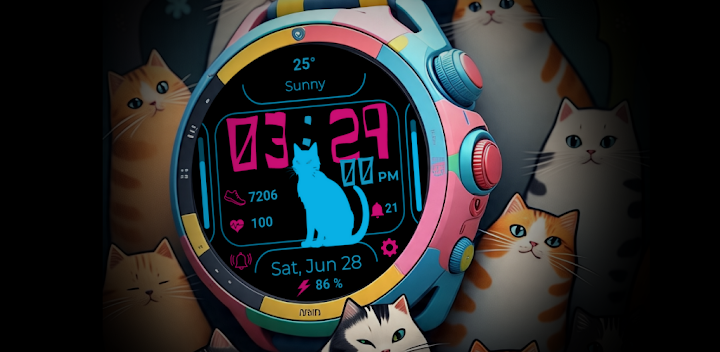
A stylish neon digital watch face with a pet cat for your Wear OS smartwatch.
Light up your wrist with the Pet Cat Watch Face by GENZYNC! This vibrant and feature-rich digital watch face is the perfect companion for your Wear OS device. Centered around a cool, neon cat silhouette, it combines a fun, modern aesthetic with all the essential, at-a-glance information you need to conquer your day.
Whether you're a cat lover or just looking for a unique and functional watch face, Pet Cat brings style and utility right to your wrist.
🐾 KEY FEATURES:
Stylish Digital Time: Clear and easy-to-read time display (supports 12/24 hour format based on your phone settings) with a unique, eye-catching font.
Your Pet Cat Companion: A sleek, neon cat silhouette sits at the center of your watch.
Complete Date Information: Displays the current date and day, with a convenient shortcut to your calendar app.
Health & Fitness Tracking:
❤️ Heart Rate: Monitor your heart rate directly from the watch face.
👟 Steps Count: Keep track of your daily steps.
📊 Steps Goal Bar: A visual progress bar on the left shows you how close you are to reaching your daily step goal.
At-a-Glance System Info:
🔋 Battery Percentage & Bar: Instantly see your watch's remaining battery life with both a percentage and a progress bar on the right.
☀️ Weather: Check the current weather condition and temperature to plan your day accordingly.
Convenient Shortcuts:
Alarm: Quick access to your alarms.
Notifications: A shortcut to check your latest notifications.
Settings: Instantly open your watch settings.
Optimized for Battery Life: Designed to be vibrant and beautiful without draining your battery.
🎨 CUSTOMIZATION:
Color Themes: Choose from a variety of neon color palettes to match your style, mood, or outfit.
Customizable Shortcuts: Change the on-screen shortcuts to launch your most-used apps with a single tap.
⌚ INSTALLATION & COMPATIBILITY:
-This watch face is compatible with all Wear OS by Google (Wear OS 3.0 and above) devices.
-Make sure your watch is connected to your phone.
-From your phone's Play Store, select your watch as the target device for installation.
-Alternatively, open the Play Store on your watch and search for "Pet Cat Watch Face" by GENZYNC.
-Once installed, long-press on your current watch face, scroll through the available faces, and select Pet Cat.
-Click "Customize" to set up your preferred colors and shortcuts.
💌 SUPPORT & FEEDBACK:
We love hearing from you! If you have any questions, suggestions, or need support, please contact us at gphoenix.apps@gmail.com .
Don't forget to leave a review if you love your new digital cat companion! Check out more unique watch faces by searching for GENZYNC on the Google Play Store.


