Featured Banner
Icon

Google Meet

© Google LLC

4.4 11592601726

Source: Google Play Store

Category: Communication

Price: Free

Content Rating: for everyone

Requires: Android 10.0+

Released on: 2016-08-16

Last Updated: 2025-12-24

(The more people request, the faster it may be included)

☑ We will notify you as soon as the App is available. If you can't receive notifications, please check back often.

About this App

High quality video calling for Android & iOS phones, tablets, Google Nest & web.
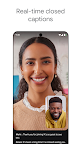
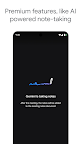
Google Meet offers secure, high-quality video calling for everyone. Whether you're catching up with family and friends or collaborating with your team, you can count on features like automatic light adjustment, noise cancellation, and real-time captions to ensure everyone can be seen and heard. Express yourself with fun effects, filters, reactions, and backgrounds. Premium features, like AI-powered note-taking and real-time speech-to-speech translation, can help everyone focus on the conversation and bridge language barriers.

Learn more about Google Meet: https://workspace.google.com/products/meet/

• Some features like AI-powered note-taking, speech translation, meeting recording, and noise cancellation are available as premium features. See https://workspace.google.com/pricing.html for more details.
• Live captions are not available in every language. See https://support.google.com/meet/answer/15077804 for more details.
• Speech translation is not available in every language. See https://support.google.com/meet/answer/16221730 for more details.
• Specific feature availability may vary based on device specifications.

Follow us for more:
X: https://x.com/googleworkspace
Linkedin: https://www.linkedin.com/showcase/googleworkspace
Facebook: https://www.facebook.com/googleworkspace/


Screenshots

I'm not a robot

In order to block spam bots, we push you a notification with the following code. Please click on the notification to complete the verification.


Notifications may be slightly delayed, please wait a moment.

Or if your device is unable to receive notifications, you can also send us an email.

Tips:

Please allow [apkz.com] to show notifications. We will notify you as soon as the App is ready.

Um, Seems that the notification is not available.
Would you like to send requests and receive updates via email?

Tips:

After the download is successful, please use [APKZ App] to install it.


Unable to determine whether the file was saved successfully, please confirm it yourself before installing.

Tips:

Your browser is out of date and some features may not work properly, please change or upgrade your browser.


For a better user experience, it is recommended to use Google Chrome or Edge.

Tips:

If the download cannot be completed, please open this page in your browser.


For a better user experience, it is recommended to use Google Chrome or Edge.

Tips:

This App can only be installed on Android devices.