Featured Banner
Icon

Google Lens

© Google LLC

4.7 3416578046

Source: Google Play Store

Category: Tools

Price: Free

Content Rating: for everyone

Requires: Android 6.0+

Released on: 2018-06-04

Last Updated: 2025-08-18

(The more people request, the faster it may be included)

☑ We will notify you as soon as the App is available. If you can't receive notifications, please check back often.

About this App

Translate words, identify plants, find products, & more—using just your camera
Google Lens lets you search what you see, get things done faster, and understand the world around you—using just your camera or a photo.

SCAN & TRANSLATE TEXT
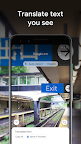
Translate words you see, save a business card to your contacts, add events to your calendar from a poster, and copy and paste complicated codes or long paragraphs into your phone to save time.

IDENTIFY PLANTS & ANIMALS
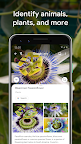
Find out what that plant is in your friend's apartment, or what kind of dog you saw in the park.

EXPLORE PLACES AROUND YOU
Identify and learn about landmarks, restaurants, and storefronts. See ratings, hours of operation, historical facts, and more.

FIND THE LOOK YOU LIKE
See an outfit that catches your eye? Or a chair that's perfect for your living room? Find similar clothes, furniture, and home decor to the one you like.

KNOW WHAT TO ORDER
See popular dishes on a restaurant menu based on reviews from Google Maps.

SCAN CODES
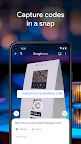
Quickly scan QR codes and barcodes.

*Limited availability and not available in all languages or regions. For further details go to g.co/help/lens. Some Lens features require an internet connection.

Screenshots

I'm not a robot

In order to block spam bots, we push you a notification with the following code. Please click on the notification to complete the verification.


Notifications may be slightly delayed, please wait a moment.

Or if your device is unable to receive notifications, you can also send us an email.

Tips:

Please allow [apkz.com] to show notifications. We will notify you as soon as the App is ready.

Um, Seems that the notification is not available.
Would you like to send requests and receive updates via email?

Tips:

After the download is successful, please use [APKZ App] to install it.


Unable to determine whether the file was saved successfully, please confirm it yourself before installing.

Tips:

Your browser is out of date and some features may not work properly, please change or upgrade your browser.


For a better user experience, it is recommended to use Google Chrome or Edge.

Tips:

If the download cannot be completed, please open this page in your browser.


For a better user experience, it is recommended to use Google Chrome or Edge.

Tips:

This App can only be installed on Android devices.