Featured Banner
Icon

Walker's Link

© GSM Outdoors

2.7 54370

Source: Google Play Store

Category: Music and Audio

Price: Free

Content Rating: for ages 17 and up

Requires: Android 8.0+

Released on: 2020-05-01

This App is not yet included in [apkz.com]. You can click the button below to request.

(The more people request, the faster it may be included)

☑ We will notify you as soon as the App is available. If you can't receive notifications, please check back often.

About this App

Walker’s Link is the official app to control Walker’s headsets.
An app experience made by Walker's users.

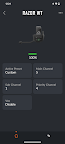
Walker’s LINK users can change Ambient Volume and Modes the same as on your headphones, but they also gain access to LINK, Ambient Mute, and Auto Shutoff features all exclusive to the app. Developed specifically for Walker’s headphones, this app will instantly elevate your experience.

Features:

Change ambient volume settings

LINK:
Link and un-link your ear bud ambient volume.

Mode:
Quickly adapt to any environment with four ambient listening modes.
1. Universal
2. Clear Voice
3. High Frequency Boost
4. Power Boost

Auto Shut Off:
Conserve battery life with the Auto Off feature, this feature will automatically power off your headset after a period of inactivity.
1. Off
2. 2 Hours
3. 4 Hours
4. 6 Hours

Ambient Mute:
Allows the user to mute the ambient pass through microphone with one touch.
ON
OFF

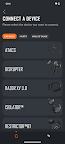
Walker's Link currently supports;
Disrupter
ATACS
Raptor
Razor XV 3.0
Silencer BT
Silencer BT 2.0

Privacy Policy: https://www.walkersgameear.com/terms-and-conditions/#privacy-policy

Screenshots

I'm not a robot

In order to block spam bots, we push you a notification with the following code. Please click on the notification to complete the verification.


Notifications may be slightly delayed, please wait a moment.

Or if your device is unable to receive notifications, you can also send us an email.

Tips:

Please allow [apkz.com] to show notifications. We will notify you as soon as the App is ready.

Um, Seems that the notification is not available.
Would you like to send requests and receive updates via email?

Tips:

After the download is successful, please use [APKZ App] to install it.


Unable to determine whether the file was saved successfully, please confirm it yourself before installing.

Tips:

Your browser is out of date and some features may not work properly, please change or upgrade your browser.


For a better user experience, it is recommended to use Google Chrome or Edge.

Tips:

If the download cannot be completed, please open this page in your browser.


For a better user experience, it is recommended to use Google Chrome or Edge.

Tips:

This App can only be installed on Android devices.