You might like:


About this App
Create shortcut of apps in notification panel with icon & light edge screen.
Customize your device's LED notifications and give them a unique touch. Here's what you can expect from our app:
All Apps:
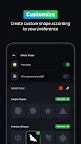
With our "All Apps" feature, you can access all the apps on your device, including user apps and system apps. You can select the notification icon for each app and customize it as per your preferences, also have the option to choose from a variety of shapes and colors.
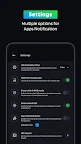
* Notification settings for your apps:
- Led Animation Time: Control the duration of the LED animation when a notification is received.
- Blink Interval: Set the frequency of LED blinks for notifications.
- Stop Timer: Define the length of time after which the LED animation will stop.
- Start Delay: Set the delay before the animation begins after a notification is received.
- Missed Call Notification: Choose to receive LED notification for missed calls.
- Show while in DND mode: Define whether the LED animation should show while the device is in "Do Not Disturb" mode.
- Battery Optimization: Specify the minimum battery level required for LED notifications to be displayed.
- Personalized LED: Control whether individual apps are displayed as an LED notification.
* Select apps to notify :
- You can select specific apps to display on your home screen.
* Also includes a service button that enables you to turn notification services on and off as needed.
Upgrade your device's notification system and
Experience a new level of personalization with "App Notification Edge Lighting." Try it out today!
Edge Lighting for app notification is a cool feature that makes your notification look cool on your screen.
Permissions :
1. Overlay Permission: We need this permission to Show the blinking icon of notification when a device is locked.
2. Read Phone State: We need this permission to check missed call or incoming call on a device and show it with edge lighting.
3. Notification listener: We need this permission to show incoming notifications for a selected application.