You might like:


About this App
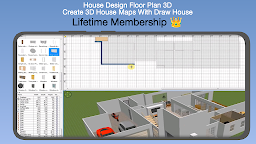
Home Plan Creator lets you create, edit and share floor plans. See them in 3D
Home & Interior Design: Your Tool for House Makeover & Redecor. 3D Floor plans.
Create beautiful interior designs for your room or house with Home Plan Creator 3D, a floor plan creator app offering more than 5,232 elements to redecor your home. Ideal for home design enthusiasts and professionals, this app is your gateway to home makeover, remodel, and renovation dreams. Whether it’s a sketchup project, a house flipper fantasy, or a spontaneous redecoration, with the help of AR Room visualization and 3D room planner it's easy and fun.
Home Plan Creator 3D Mobile is designed for individuals seeking to swiftly create interior designs, whether for relocating or renovating their current residence or workspace. With Home Plan Creator 3D, you can:
- Sketch walls and rooms from scratch or based on existing plans, across multiple levels.
- Modify wall, floor, and ceiling colors or textures, even importing custom patterns.
- Easily place doors, windows, and furniture from a catalog of over 800 items, or import 3D models.
- Tailor the size, orientation, elevation, colors, and textures of each furniture piece.
- Preview changes in both 2D and 3D views, with options to navigate from aerial or visitor viewpoints.
- Add annotations such as room areas, dimension lines, text, arrows, and a compass rose.
Home Plan Creator 3D Mobile seamlessly integrates with the desktop version, enabling the creation of photorealistic images, virtual path videos, printable home plans, and export options including PDF, PNG, JPEG, SVG, and OBJ formats for versatile usage across different software platforms.
Features:
* Projects can have multiple floors with rooms of any shape (straight walls only).
* Automatic calculation of room, walls and level area; perimeter; counts of symbols.
* S-Pen and mouse support.
* 3D tour mode.
* Symbol library: doors, windows, furniture, electrical, fire survey.
* User defined dimension lines to show and modify distances and sizes.
* Cloud synchronization to automatically backup and share plans between devices.
* Export as image, PDF, DXF, SVG, print to scale.
* Supports metric and imperial units.
Available in English, French, German, Italian, Spanish, Portuguese, Dutch, Swedish, Czech, Polish, Hungarian, Bulgarian, Greek, Russian, Vietnamese, Chinese and Japanese.