You might like:


About this App
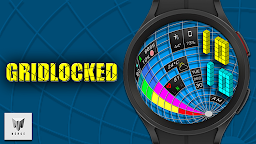
A uniquely designed Isometric digital watch face made for Wear OS
One more in a series of exclusive "Isometric' designed smart watch faces made for Wear OS. No where else can you find something so different for your Wear OS wearable!
This Isometric watch incorporates Isometric design into the typical items such as heart rate, steps, and battery power that you see on any other face but in an utterly different style.
***This watch face for APK 34+/Wear OS 5 and above***
Features include:
* Built in weather that displays weather data from your weather app installed on your watch/phone. Data displayed includes temperature, high and low temperature, custom weather icons, and scrolling weather conditions.
* 30 different color themes to choose from.
* 12/24 Hour time according to your phone’s settings
* 2 customizable Small Box Complications allowing for the addition of the information you want to be displayed. (Text+Icon).
* Displays date
* Displays numerical watch battery level (0-100%) as well as graphical gauge indicator (0-100%) that changes color (green, yellow, red) as power decreases. When battery level reaches less than 20%, the battery icon will flash red on/off. Tap the battery icon to open the watch battery app.
* Displays daily step counter & step goal % with custom graphic indicator. Step goal is Synced with your device through Samsung Health App or default health app. The graphic indicator will stop at your synced step goal but the actual numeric step counter will continue to count steps all the way up to 50,000 steps. To set/change your step goal, please refer to the instructions (image) in the description. Also displayed along with step count is calories burned and distance travelled in KM or Miles. A check mark (✓ ) will be displayed beside the step icon to show that the step goal has been reached. (see instructions in main store listing for complete details). Tap the step icon to open the health app.
* Displays heart rate (BPM) and you can also tap the heart rate Area to launch your default Heart Rate App. Yellow, red, green indicators showing low, normal, high heart rates. Tap the heart rate area to open the heart rate App.
Made for Wear OS