You might like:


About this App
Uniquely designed animated “Isometric” digital smart watch face made for WearOS.
**Animated watch face!**
Sit back and imagine you are on a distance planet's space base waiting for your flight with a cup of coffee or a cocktail .Enjoy the the view of the space ships landing in the docking bay and taking off in front of the giant moon in the background.
One more in a series of exclusive Isometric designed smart watch faces. No where else can you find something so different for your Wear OS wearable!
Isometric design can be seen all over in print, television, Internet media as well as in video game design whereas a 3D effect is achieved using 2D authoring tools. Now it can be seen on your watch face too!
Features include:
- 19 different color combinations available for the digital display.
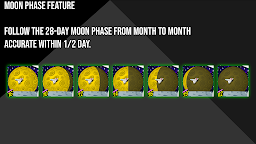
- A true 28 day Moon Phase graphic displayed on the big moon in the background accurate within +/- half a day. Watch for it’s daily changes as the month goes on!
- displays daily step counter with graphic indicator (0-100%). Tap on the step icon to launch the step counter app on your device. The step counter will continue to count steps all the way up to 50,000 steps.
- displays heart rate (BPM). Tap anywhere on the heart icon to launch the default heart rate app on your device.
- displays watch battery level with graphic indicator (0-100%). Tap anywhere on the watch icon to launch the watch battery app on your device.
- displays the day of the week and the date. Tap on the area to launch the calendar app on your device.
- 12/24 HR clock that automatically switches according to your phone's settings
***This app can only be installed on your watch. There is no option to install the app first on your phone and from there, onto your device.
If you see a compatibility warning, that is to tell you that it is not compatible with your phone. You can simply scroll down and you should see that your device (watch) will already be selected for installation.
You can also do this by accessing your Galaxy Wearable app on your phone if you have a Galaxy Watch.
***After the watch is downloaded and installed on your device, it is simply a matter of long pressing the screen and scrolling to the very far right where you will see the option to add a new watch face. Simply press that and scroll down and the installed watches will be shown including then you just downloaded. Select the face and that’s it!
***In my own testing I have noticed is sometimes when these faces with animation are first loaded, the animation will appear jerky and not smooth. If this occurs, just let the watch “settle down” and shorty, the animation will be smooth as intended.
Made for Wear OS