You might like:


About this App
Powerful video player with advanced hardware acceleration and subtitle supports
Powerful video and music player with advanced hardware acceleration and subtitle supports
a) HARDWARE ACCELERATION - Hardware acceleration can be applied to more videos with the help of new HW+ decoder.
b) MULTI-CORE DECODING - MX Player is the first Android video player which supports multi-core decoding. Test results proved that multi-core device's performance is up to 70% better than single-core devices.
c) PINCH TO ZOOM, ZOOM AND PAN - Easily zoom in and out by pinching and swiping across the screen. Zoom and Pan are also available by option.
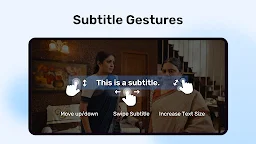
d) SUBTITLE GESTURES - Scroll forward/backward to move to next/previous text, Up/down to move text up and down, Zoom in/out to change text size.
e) Privacy Folder - Hide your secret videos to your private folder and protect your privacy.
f) KIDS LOCK - Keep your kids entertained without having to worry that they can make calls or touch other apps.
Subtitle formats:
- DVD, DVB, SSA/*ASS* subtitle tracks.
- SubStation Alpha(.ssa/.*ass*) with full styling.
- SAMI(.smi) with Ruby tag support.
- SubRip(.srt)
- MicroDVD(.sub)
- VobSub(.sub/.idx)
- SubViewer2.0(.sub)
- MPL2(.mpl)
- TMPlayer(.txt)
- Teletext
- PJS(.pjs)
- WebVTT(.vtt)
******
Permission Details:
–––––––––––––––––––
* "READ_EXTERNAL_STORAGE" is required to read your media files in your primary & secondary storages.
* "WRITE_EXTERNAL_STORAGE" is required to rename or delete files and to store the downloaded subtitles.
* "LOCATION" permission is required to help find nearby friends.
* "NETWORK" and "WIFI" permissions are required to get the network status which is required for various activities like license checking, update checking etc.
* "BLUETOOTH" permission is required in order to improve AV sync when the Bluetooth headset is connected.
* "CAMERA" permission is required to scan QR code.
* "INTERNET" is required to play internet streams.
* "VIBRATE" is required to control the vibration feedback.
* "WAKE_LOCK" is required to prevent your phone from sleeping while watching any video.
* "KILL_BACKGROUND_PROCESSES" is required to stop the MX Player services used in background play.
* "DISABLE_KEYGUARD" is required to temporarily prevent secure screen lock when Kids Lock is used.
* "SYSTEM_ALERT_WINDOW" is required to block some keys when Kids Lock is used.
* "DRAW OVER OTHER APPS" is required to block system buttons when input blocking is activated on the playback screen.
******
If you are facing "package file is invalid" error, please install it again from product home page (https://mx.j2inter.com/download)
******
If you have any questions, please visit our Facebook Page or XDA MX Player forum.
https://www.facebook.com/MXPlayer
http://forum.xda-developers.com/apps/mx-player
Some of the screens are from the Elephants Dreams licensed under the Creative Commons Attribution 2.5.
(c) copyright 2006, Blender Foundation / Netherlands Media Art Institute / www.elephantsdream.org
Some of the screens are from the Big Buck Bunny licensed under the Creative Commons Attribution 3.0 Unported.
(c) copyright 2008, Blender Foundation / www.bigbuckbunny.org