Featured Banner
Icon

Tap Scroll - Perfect Scroll

© Do It Myself

3.7 341399

Source: Google Play Store

Category: Tools

Price: Free

Content Rating: for everyone

Requires: Android 7.0+

Released on: 2022-06-30

This App is not yet included in [apkz.com]. You can click the button below to request.

(The more people request, the faster it may be included)

☑ We will notify you as soon as the App is available. If you can't receive notifications, please check back often.

About this App

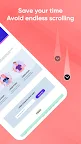
Bye bye endless scrolling: Tap on status bar to scroll up quickly
Tired of frantically swiping up to get back to upper of the page?
TapScroll makes it easy to scroll to upper of the page, with just one simple tap: a quick tap at the status bar (upper of the screen)
To try this, open an app with a scrolling page, such as a web page, Mail list, or a long document, and swipe as you normally would to scroll down a bit. When you want to go back to upper, tap once at upper of the screen (tap the status bar), and TapScroll will quickly bring you to upper of the page.

TapScroll also supports many other gesture operations such as:
- Double Tap: at upper of the screen (Double Tap on the status bar) to scroll to the bottom of the page
- Long press, swipe left, swipe right: with actions such as: show power off dialog, back, return to Home, Recents, toggle flash, expand notification, expand quick setting
Use TapScroll and you'll Stop having to frantically swipe up to get back to a website's navigation menu or view your latest emails. If you keep this function in mind and use it often, or a habit, it will save you a lot of time, not having to repeat scrolling up and down continuously.
Note:
- This application requires Accessibility Service to support click on the status bar to scroll the page or quickly enable other options.
We always make the app better every day. Please share with your friends to support us. Thank you!

Screenshots

I'm not a robot

In order to block spam bots, we push you a notification with the following code. Please click on the notification to complete the verification.


Notifications may be slightly delayed, please wait a moment.

Or if your device is unable to receive notifications, you can also send us an email.

Tips:

Please allow [apkz.com] to show notifications. We will notify you as soon as the App is ready.

Um, Seems that the notification is not available.
Would you like to send requests and receive updates via email?

Tips:

After the download is successful, please use [APKZ App] to install it.


Unable to determine whether the file was saved successfully, please confirm it yourself before installing.

Tips:

Your browser is out of date and some features may not work properly, please change or upgrade your browser.


For a better user experience, it is recommended to use Google Chrome or Edge.

Tips:

If the download cannot be completed, please open this page in your browser.


For a better user experience, it is recommended to use Google Chrome or Edge.

Tips:

This App can only be installed on Android devices.