You might like:


About this App
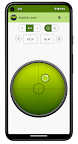
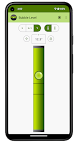
Bubble level will help you position objects vertically and horizontally.
What is Bubble level?
Bubble level, often called spirit level, is a device that measures angular deviations. This instrument is useful in many everyday situations - during construction work, renovation, leveling various objects and other activities. Bubble level indicates a vertical (plumb) or horizontal (level) surface. Traditional bubble level has a leveling element - an air bubble in a tube with liquid.
Our app is a digital device that uses sensors in your phone but its interface imitates a traditional spirit level to make it user-friendly. Measurements are made with the highest possible accuracy using three accelerometers. The app offers accurate measurements, user-friendly interface. It is very handy, useful and free!
Key Features
• Horizontal measurement (X mode), vertical measurement (Y mode) and hybrid level measuring on both axis (X+Y mode)
• Classic mode (maximum bubble deviation is 45°) and engineer's mode (maximum pointer deviation is 10°)
• Calibration for each mode (X, Y, X+Y) is set individually
Your device should already be calibrated by the manufacturer. If you think it has been calibrated incorrectly, you can recalibrate your device. To calibrate the device, press the icon (four arrows pointing to center) located close to the values of measured angles. Place the edge of your phone on the reference surface and press the Calibrate button. Calibration is needed due to differences in sensors and uneven edges (e.g. buttons, camera lenses, cases). Calibration is set separately for X, Y and X+Y modes.
• Adjustable viscosity - you can set low, medium or high measurement inertia - higher viscosity means slower and smoother movement of the bubble (pointer)
• Acceptable level - configurable acceptable deviation (values from 0° to 1°, default <0.3°)
• Visual, sound and vibration notifications when acceptable level is reached
• Screen always on - to prevent the device from going into sleep mode
• Orientation locking
• Light and dark theme support
When will it be useful?
• Perfect leveling of furniture e.g. a desk or a billiard table
• Hanging pictures or other objects on the wall
• Set up refrigerator, washing machine or tripod for the camera
• Levels your trailer, camper or picnic table
• You can check the angle of inclination of each surface and much more
• This device should be in every home!
About Us
• Visit SplendApps.com: https://splendapps.com/
• Our Privacy Policy: https://splendapps.com/privacy-policy
• Contact Us: https://splendapps.com/contact-us
Follow Us
• Facebook: https://www.facebook.com/SplendApps/
• Instagram: https://www.instagram.com/splendapps/
• Twitter: https://twitter.com/SplendApps