
You might like:


About this App
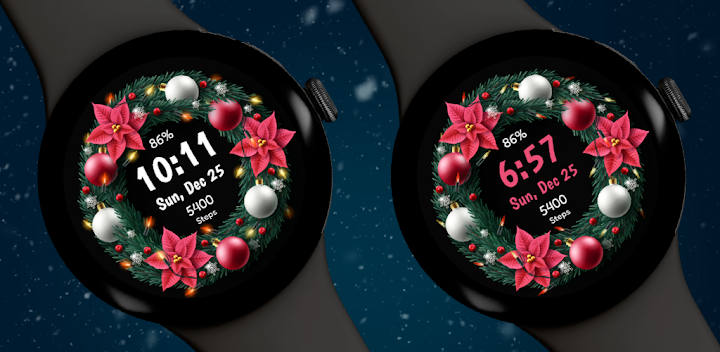
Elegant, luxurious watchface with a beautifully decorated and animated wreath
Our elegant and luxurious Christmas Wreath watchface features a beautifully decorated wreath, adorned with sparkling Christmas lights that twinkle and dance before your eyes. The intricate details and rich, festive colors of the wreath create a warm and inviting atmosphere, perfect for getting into the holiday spirit. Whether you're at the office or out and about, this watchface will add a touch of glamour and sophistication to your daily look. So why wait? Get in the holiday mood and deck the halls with our chic Christmas Wreath watchface!
With 30 color themes to choose from, 1 customizable complication, 3 customizable app shortcuts, digital clock in 12 or 24H format, date in English and a custom designed AOD, the Christmas Wreath watchface is the perfect watchface for this Christmas!
🎅 Explore the entire Christmas Collection in our new Watchface Shop app and grab the best value with a bundle that includes all seasonal watchfaces. Discover your perfect Christmas style - https://play.google.com/store/apps/details?id=com.starwatchfaces.watchfaces 🎅
Issues installing the watchface on your Wear OS watch? Check the companion phone app for step by step instructions!
To customize the watchface:
1. Press and hold on the display
2. Tap the Customize button to select color theme, complication data and the apps to launch with the custom shortcuts.
Check out the entire Winter Collection: https://starwatchfaces.com/wearos/collection/winter-collection/
Don't forget: use the companion app on your phone to discover other amazing watchfaces made by us!
The complication can display*:
- Weather
- Feels like temp
- Barometer
- Bixby
- Calendar
- Call History
- Reminder
- Steps
- Date and weather
- Sunrise/sunset
- Alarm
- Stopwatch
- World Clock
- Battery
- Unread notifications
To display the data you want, tap and hold on the display, then press the Customize button and choose the data you want for the complication.
For the customizable shortcuts you have these options*:
- App shortcut: Alarm, Bixby, Buds controller, Calculator, Calendar, Compass, Contacts, Find my phone, Gallery, Google Pay, Maps, Media Controller, Messages, Music, Outlook, Phone, Play Store, Recent apps, Reminder, Samsung Health, Settings, Stopwatch, Timer, Voice
Recorder, Weather, World Clock
- Recent apps
- Blood Oxygen
- Body Composition
- Breathe
- Consumed
- Daily Activity
- Heart rate
- Sleep
- Stress
- Together
- Water
- Woman’s health
- Contacts
- Google Pay
- Exercises: Circuit training, Cycling, Exercise bike, Hiking, Running, Swimming, Walking etc
To display the shortcut you want, tap and hold on the display, then press the Customize button and choose the shortcut you want for the bottom complication.
* these functions are device dependent and might not be available on all watches
For more watchfaces, visit our website.
Enjoy!


